





Alta SyncReplay: Designing for Review During the Procedure






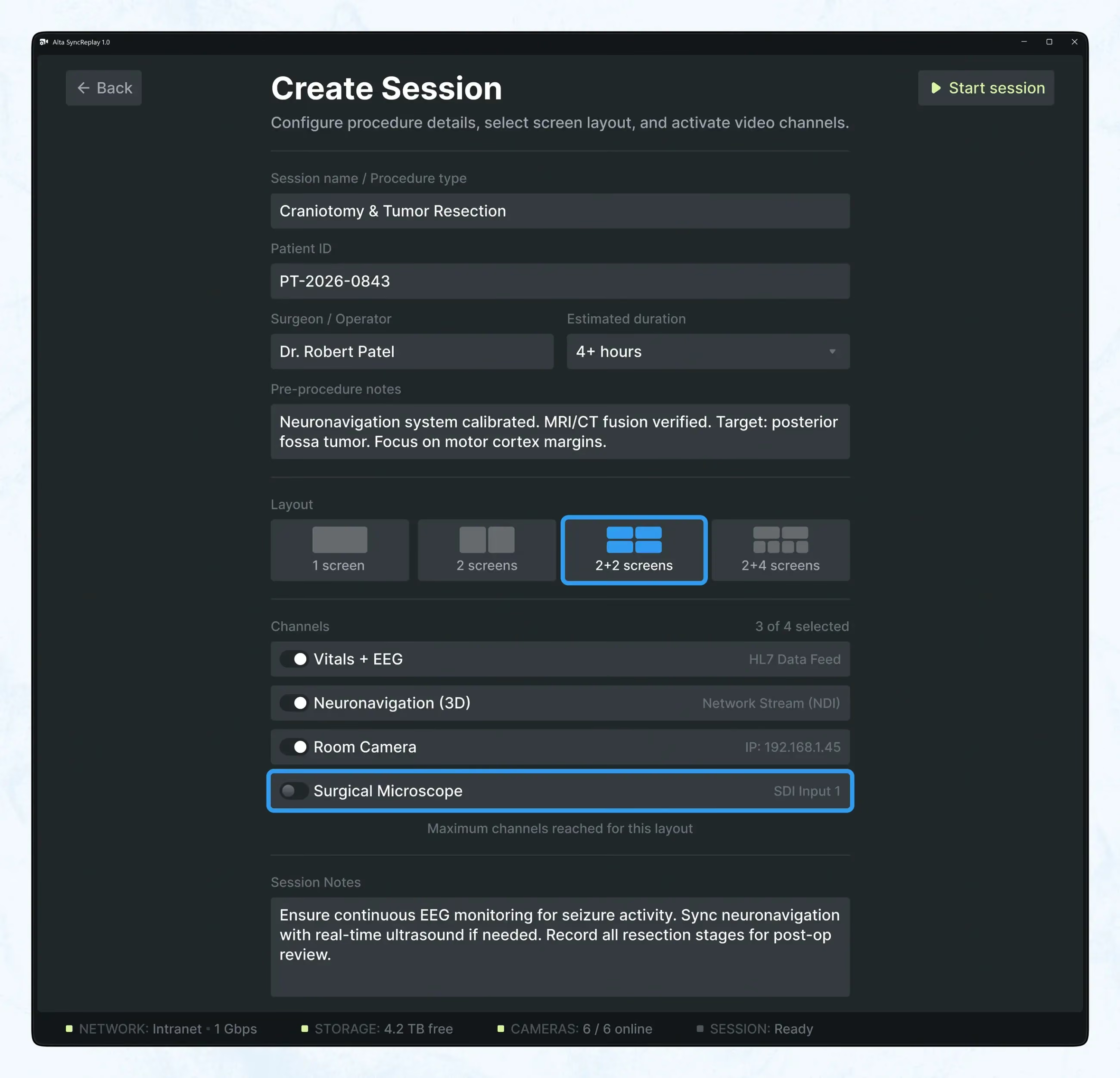
Alta SyncReplay is a clinical replay and remote support platform that brings up to eight procedural feeds into one interface, so teams can review what just happened while the procedure is still underway.
That is the product’s real value. A system that makes one procedural moment readable across imaging, telemetry, room view, device outputs, and timing — while that moment still matters.
The Problem Was Fragmentation
In complex procedures, the issue is rarely a lack of data. The issue is that the data lives in different places, follows different logic, and forces the team to assemble context manually.
Alta SyncReplay was built to remove that gap. Instead of asking clinicians to switch between systems and remember what they saw seconds ago, it aligns multiple sources into one shared view. The goal was not to show more. It was to make a moment interpretable.
Replay Had to Be Part of the Workflow
One of the key product decisions was treating replay as an active tool, not an archive.
Users could rewind a live session, inspect a previous moment, and return to the present without losing continuity. Timeline scrubber, markers, bookmarks — all of it existed for one reason: to make comparison fast enough to be useful during the procedure itself.
That mattered because the real task was often simple and critical at the same time: compare the current state with an earlier reference point and check whether an action changed what it was supposed to change.
Replay was there to support verification, not documentation.
Three Modes, Three Different Jobs
Alta SyncReplay was structured around three modes: Live, Replay, and Live + Replay.
Live
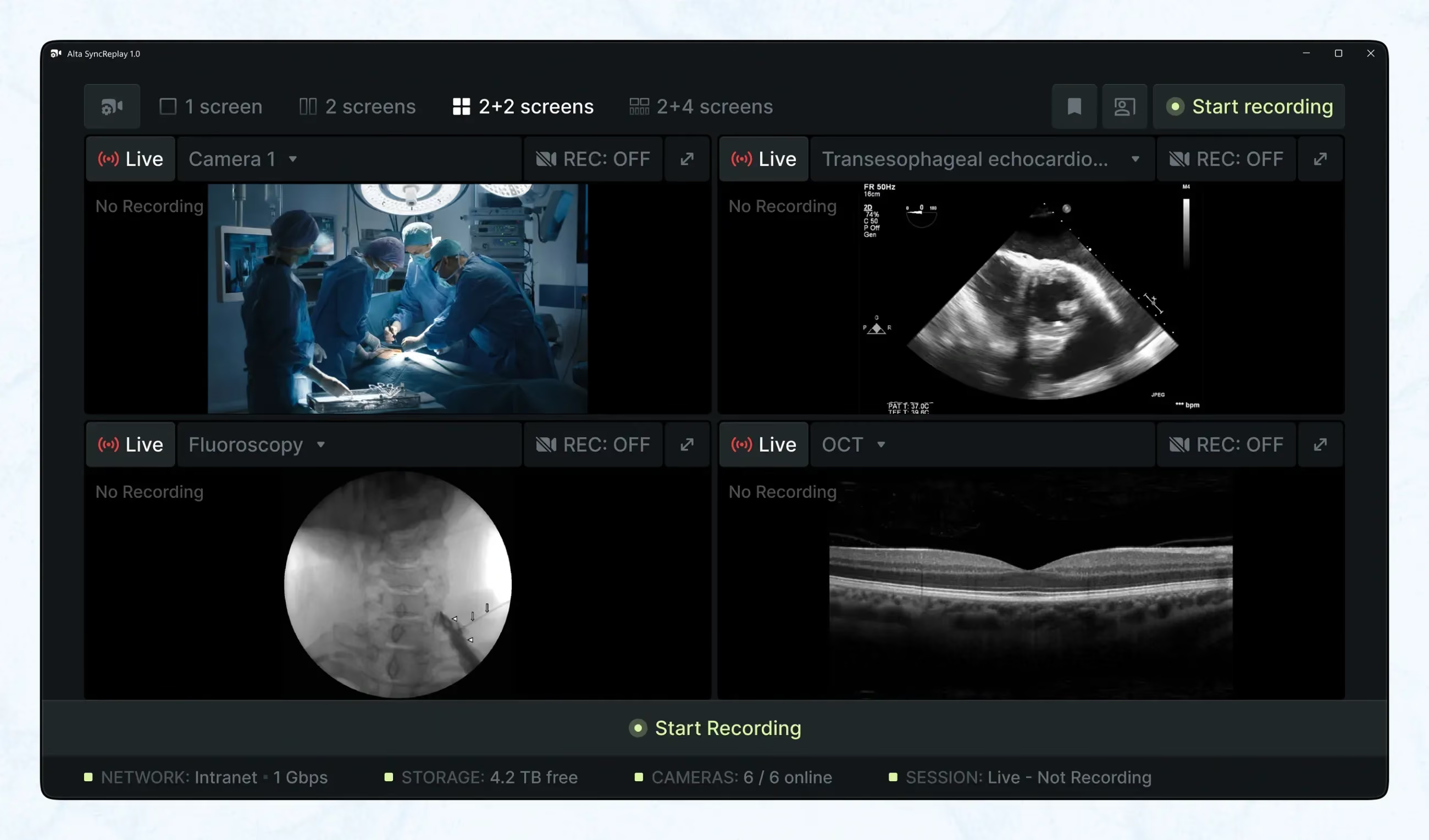
Live Mode supported ongoing awareness. It had to stay readable at a glance, from a distance, without asking for too much attention.
Replay
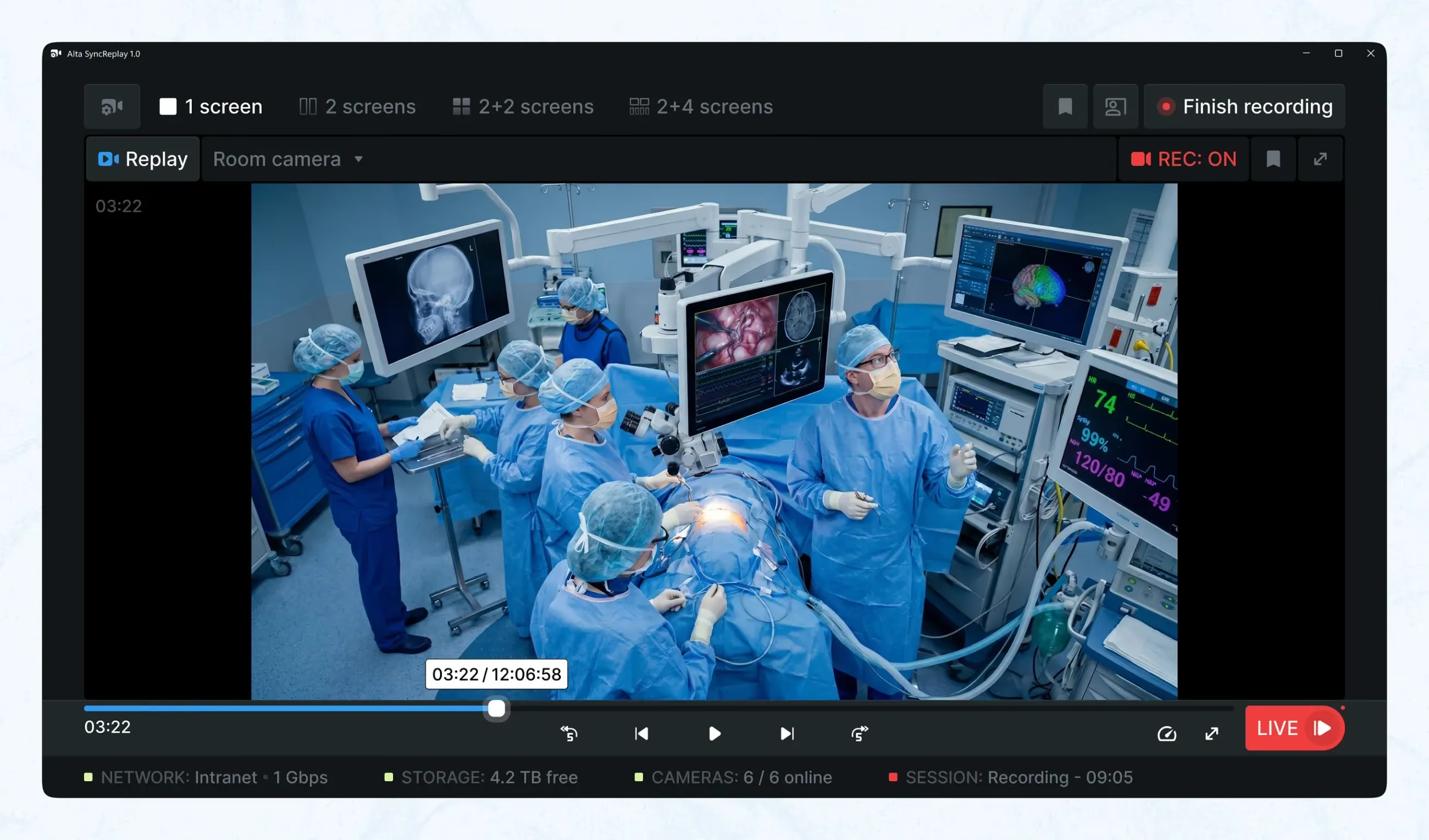
Replay Mode supported focused review. It gave the team a way to inspect sequence, timing, and causality more deliberately.
Live + Replay
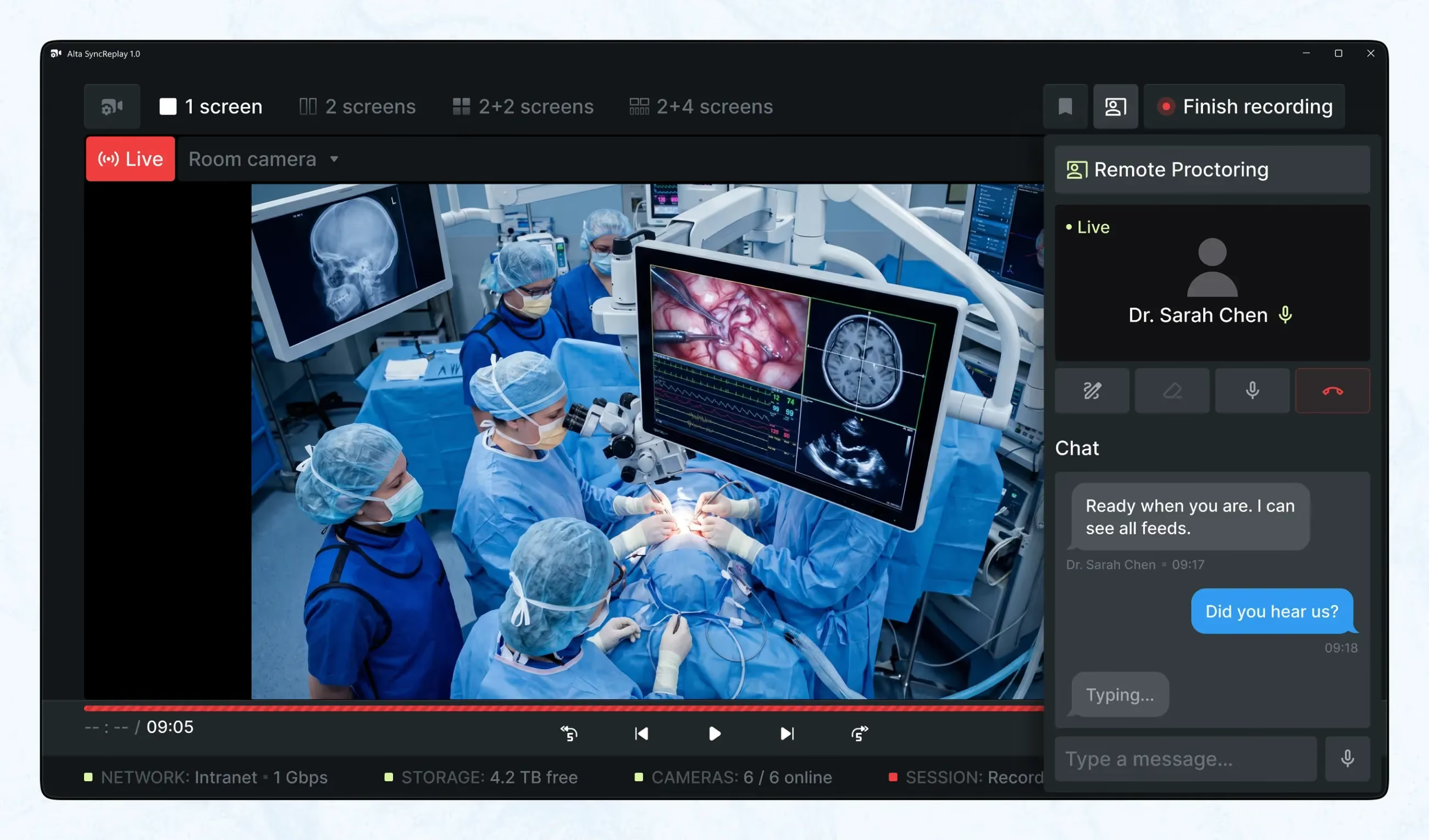
Live + Replay was the most useful mode in practice. It allowed direct comparison between the current feed and a previous landmark, helping users verify placement, change over time, or patient response.
The modes were not there to add variety. They existed because monitoring, reviewing, and comparing are different tasks.
High Density Needed Hierarchy
The interface could show one, two, four, or more feeds, with up to eight in the composite view. That made information hierarchy the central UX problem.
Alta SyncReplay handled this through case-based presets. Different procedures required different priorities, so the system surfaced the most relevant sources by default while still allowing setup before the case.
That was the right trade-off: more flexibility before the procedure, less friction during it.
One Logic Across Different Screens
The platform had to work across large displays in procedure rooms and observing rooms, workstation monitors, and devices used for training or review.
The important decision here was consistency. The layouts could adapt, but the logic stayed the same. Users did not need to relearn the interface from one context to another, and teams stayed aligned around the same screen language.
Built for Real Conditions
This was a system for operators, remote experts, technicians, imaging specialists, and support staff. During the procedure, interaction had to stay minimal: few clicks, large targets, minimal text, stable structure.
That was not a stylistic choice. It came from the actual conditions of use — distance from screen, sterile environment, noise, urgency, interrupted attention.
The product had to work in those conditions, not in ideal ones.
More Than Live Support
The same structure that made live review useful also made the platform valuable afterwards. Once a moment could be synchronised, bookmarked, anonymised, and extracted into a short snippet, it became useful for case review, training, troubleshooting, and knowledge sharing.
That extended the product beyond remote support into something more durable: a system for capturing and reusing clinically meaningful moments with context still intact.
Why It Worked
Alta SyncReplay solved two connected problems: fragmented context and delayed expert feedback.
By aligning multiple sources into one shared view, it let local and remote teams interpret the same event in the same temporal frame. By making replay operational, it turned past moments into something usable during the live workflow. By using presets and hierarchy, it kept the interface dense but manageable.
Its advantage was not more data. It was better context, delivered at the right time.

Frequently Asked Questions
How quickly can we launch an MVP?
With our "Rapid Sprint" model, we can deliver a clickable core prototype and visual style in 2-3 weeks, ready for investor pitching or development.
What problems does Post-MVP Evolution solve?
It solves four core problems that kill growth-stage products: the Beta Stigma where the product works but looks risky to big clients; Retention Leaks where chaotic UX drives churn; Velocity Trap where developers code every screen from scratch; and Support Overload where bad UX spikes ticket volume.
How do I choose the right solution for my product stage?
By stage. Pre-product and raising: Pitch Deck & Product Concept. Funded with no shippable product: MVP Design & Development. Live product with churn or unclear friction: Product Audit & Discovery. Legacy platform at a growth ceiling: Product Rebuild & Redesign. Roadmap but no hiring bandwidth: Dedicated Product Team. Unsure – a short discovery call maps your stage to the model.
How long does a full rebuild usually take?
Timelines depend on complexity, but most full rebuilds take between 4 and 9 months from discovery to launch. We break the work into phases with clear milestones, so you can see progress every 2 weeks and start using parts of the new system before the final switch-over.
Do we have to rebuild the entire product at once?
No. We can focus on the most critical modules first – for example, onboarding, trading flows or admin dashboards – and modernise the rest in later phases. This staged approach reduces risk and lets you see ROI earlier while still moving toward a full relaunch.
