





Saved Views UX: How to Design Workspaces Power Users Return To





Written for product designers and product managers building data-heavy tools that people open every day.
Saved views UX is the design of how users create, store and return to named combinations of filters, sorting and layout in a data-heavy product. This article covers the workspaces we designed for Magic Markets, a sports prediction market with an exchange order book, and what happened to them.
Every power user rebuilds the same view every morning. A trader opens the platform, picks the sports they follow, narrows the leagues, chooses the markets, sorts by start time and only then starts working. Most products answer this with a small "Save filter" button that few people find and fewer use.
On Magic Markets, our design team took the idea further. We brought in a pattern from an earlier project of ours and turned saved filters into workspaces: named views of the market that a user builds once, switches between in one click and uses as their main working surface. We still think workspaces were the strongest idea in the project. The client chose a more familiar structure for launch, and this article covers both the design and what we learned from that decision.
Live product. Magic Markets is live at magicmarkets.com today, without workspaces. The concept below is the one we designed and argued for, and the lessons at the end come from how that decision went. Three labels mark status throughout the series: Live product for what runs on magicmarkets.com today, Design exploration for directions we designed and compared, and MVP direction for what we proposed for the first release.
TL;DR
- A saved view earns its place when users repeat the same filtering every session.
- Start every user with a working template and a favourites view that can't be deleted, so nobody meets an empty screen.
- Let users save after editing a live list, and keep quick changes inside the current view automatically.
- Separate local presets for one strategy from global templates that work anywhere.
- Saved views can teach a product: toggling a filter and watching the list change is faster than reading documentation.
- If stakeholders reject a feature you believe in, propose the cheapest possible test.
What Is a Saved View, and When Does a Product Need One?
A saved view is a named combination of filters, sorting and layout that a user can return to directly. In a data-heavy product it becomes a working surface: the place a user opens first and spends most of their time.
A product needs one when three things are true. Users apply the same filters more than once per session, the full data set is too large to scan, and different tasks need different slices of the same data. A sports exchange meets all three. One event carries dozens of markets, a single day has hundreds of events, and the same trader may monitor live football liquidity in the afternoon and price NBA lines in the evening.
The signal is easy to spot in research. When users describe their routine as a sequence of filter steps ("first I pick..., then I hide..., then I sort..."), they are describing a saved view the product hasn't built yet.
Where Did the Idea of Workspaces Come From?
Design exploration. From two places: the personas and a dashboard we had designed before. Our early research described pro traders who build their own watchlists and work from preset strategies, and casual bettors who want popular events and a simple Yes/No view. Both groups needed a way to see less of the market, in different ways.
The pattern came from an affiliate dashboard we designed for a client in Asia, which we can't name yet. That product served several types of affiliates, and one person could belong to more than one type at once, for example a first-level affiliate who also manages second- and third-level partners. Each role needed different data, so each got its own workspace, and switching workspace switched the whole context. A bettor on Magic Markets has the same shape of problem: one person follows different leagues, markets and strategies at different times. We applied the pattern to the market: each workspace holds its own sports, leagues, markets, time grouping and sort order, and switching workspace switches what the trader is looking at. I developed the workspaces concept for Magic Markets as design lead, together with Flatstudio designer Roman Danyliuk.
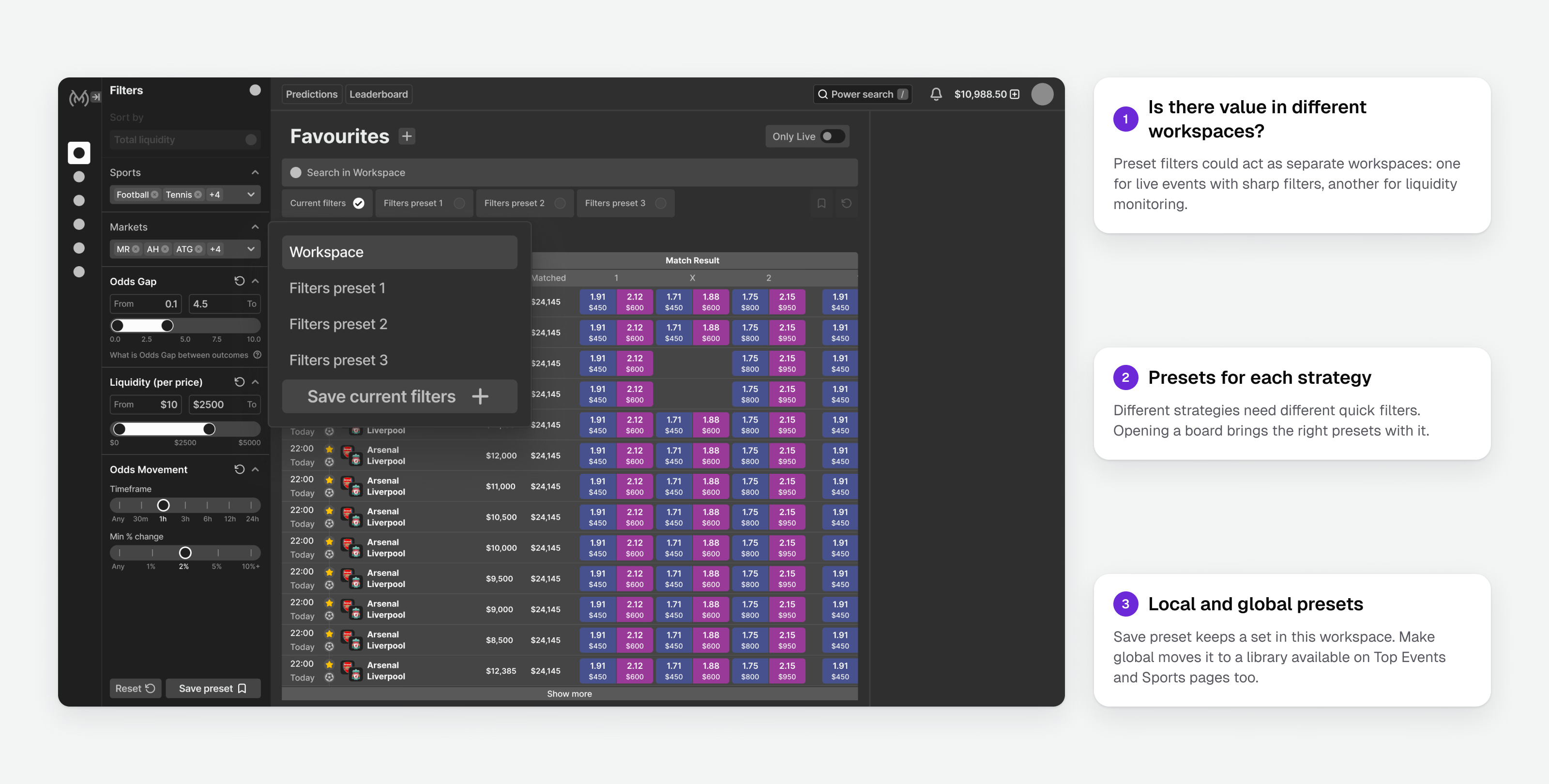
The first wireframes questioned the idea openly. One note on the board asked what the value of separate workspaces was, and whether preset filters alone could do the same job. We kept both, with different roles:
- Workspaces hold a strategy: a live view with sharp filters, a liquidity monitoring view, an NBA view.
- Presets are quick filters inside a workspace. Saved locally, they act as hotkeys for that strategy. Marked as global, they become templates the user can apply anywhere, including discovery pages such as Top Events.
Should a New User Start From an Empty Workspace or a Template?
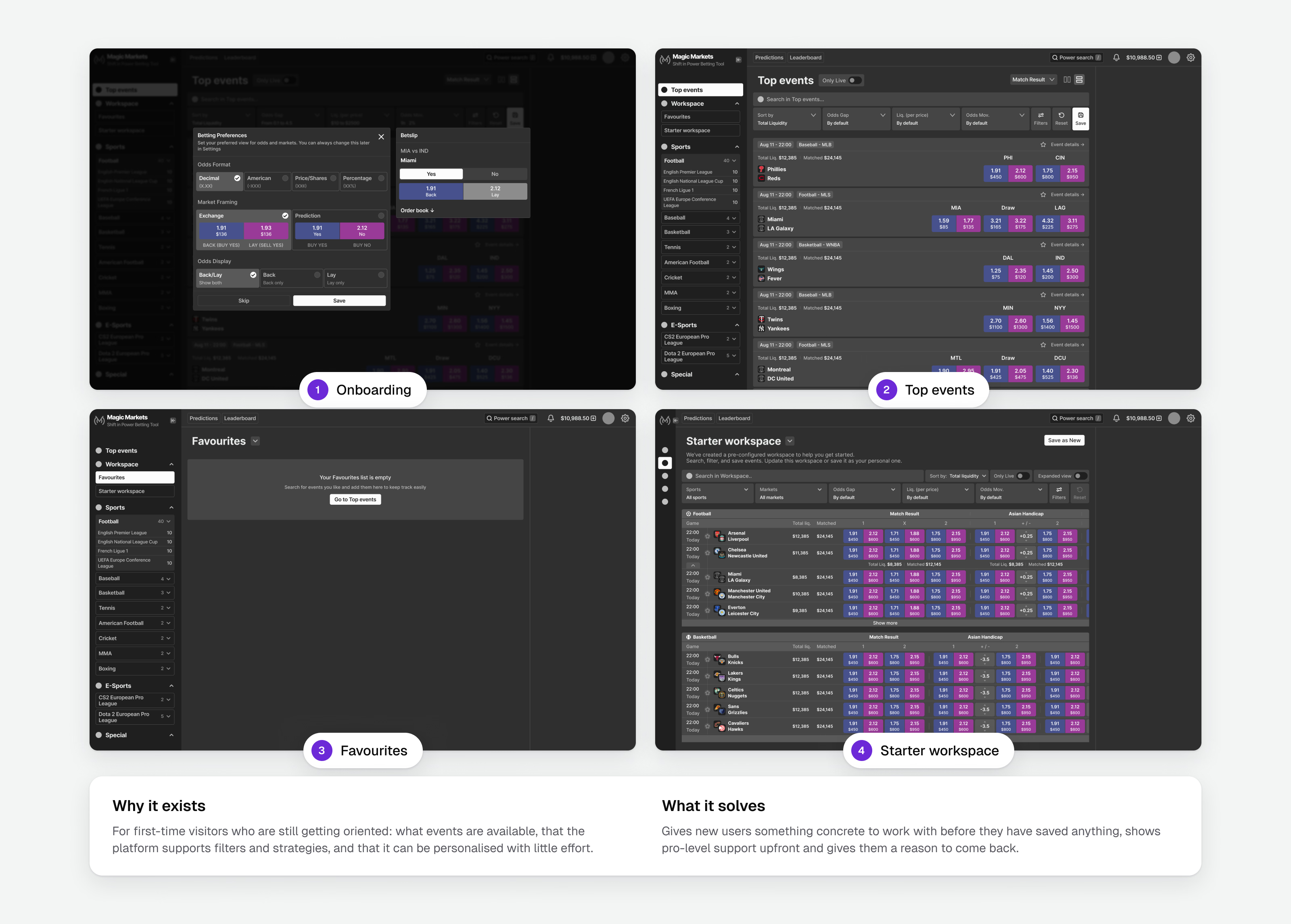
MVP direction. From a template, always. An empty workspace asks a newcomer to configure a product they don't understand yet. The Magic Markets design gave every account two workspaces from day one:
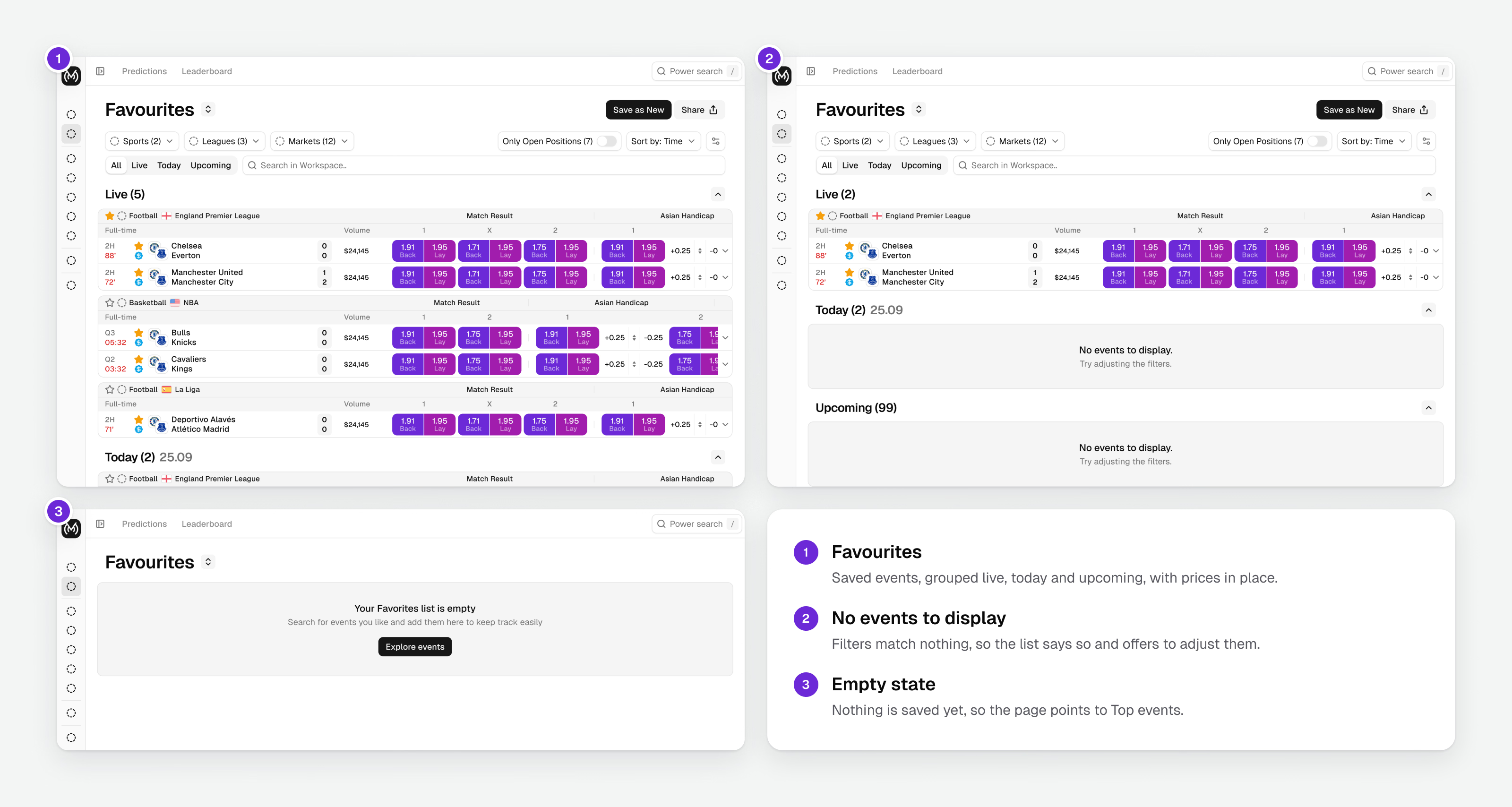
- Favourites collects starred events, leagues and sports. It is the one workspace that can't be deleted, because every user needs a stable home. Starring an event adds its sport to the workspace filters automatically.
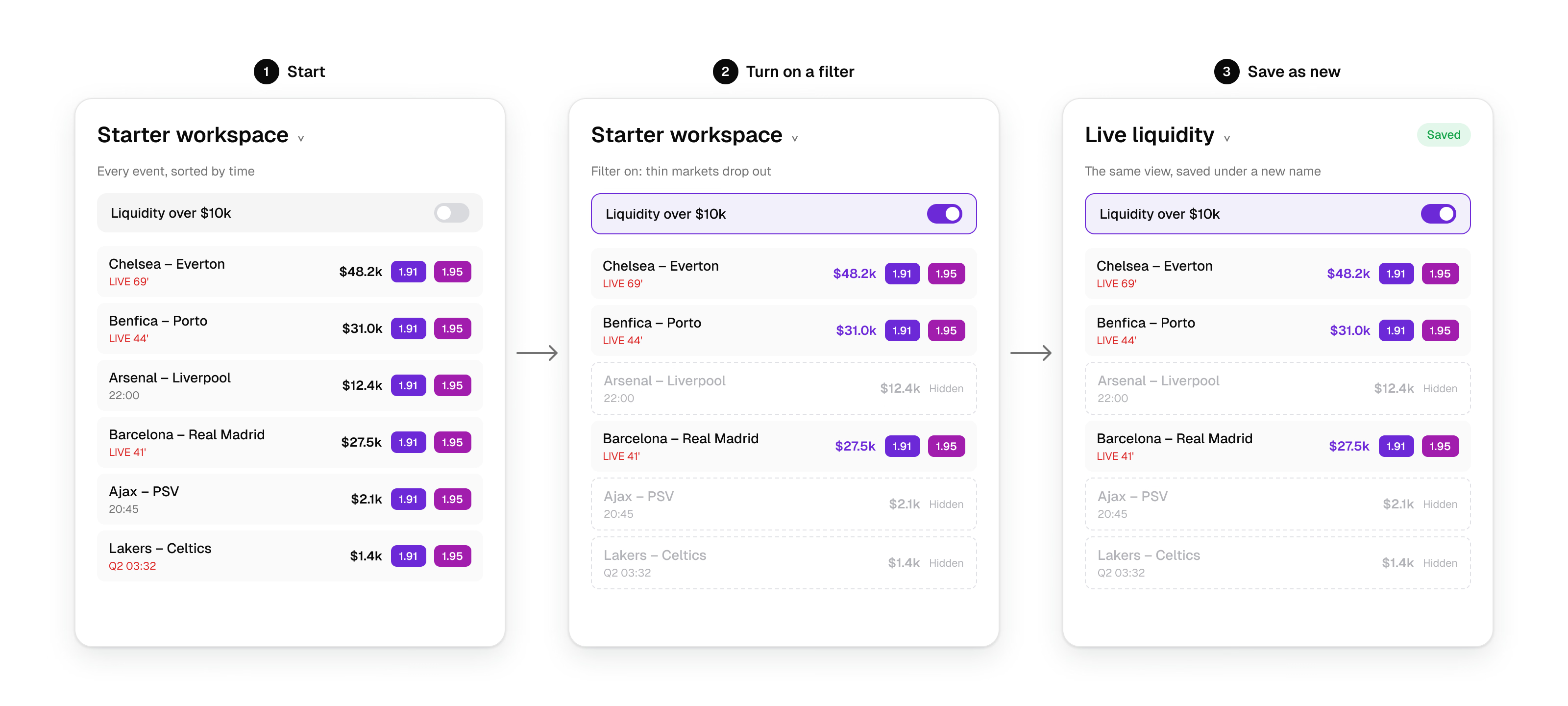
- Starter workspace comes preconfigured with a minimal set of sports and markets and explains itself in one line: search, filter and save events, then update this workspace or save it as your own.
The introduction flow in our wireframes had a clear brief: show a first-time user what kinds of events exist, show that the platform supports filtering and strategies, and let them personalise with minimal effort. A pre-built workspace does all three before the user changes anything.
Templates also open a door for the product team. Beyond the Starter workspace, the team can publish ready-made workspaces for specific approaches (live liquidity, early prices, a single league) and use them as a way to show what the filters can do.
Saved Views UX: Which Settings Belong to a Workspace?
Everything a user would otherwise repeat. In the Magic Markets design a workspace stores:
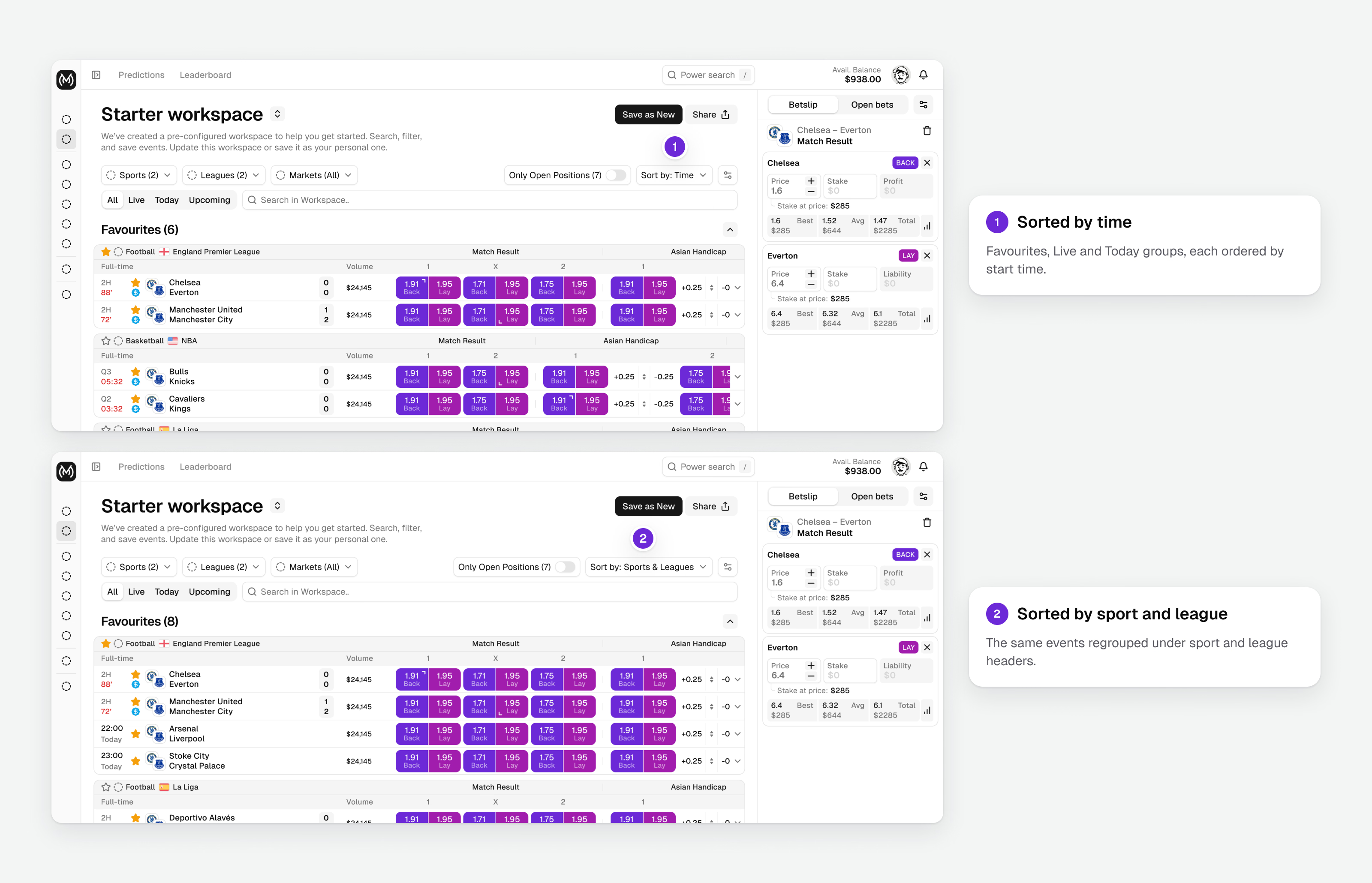
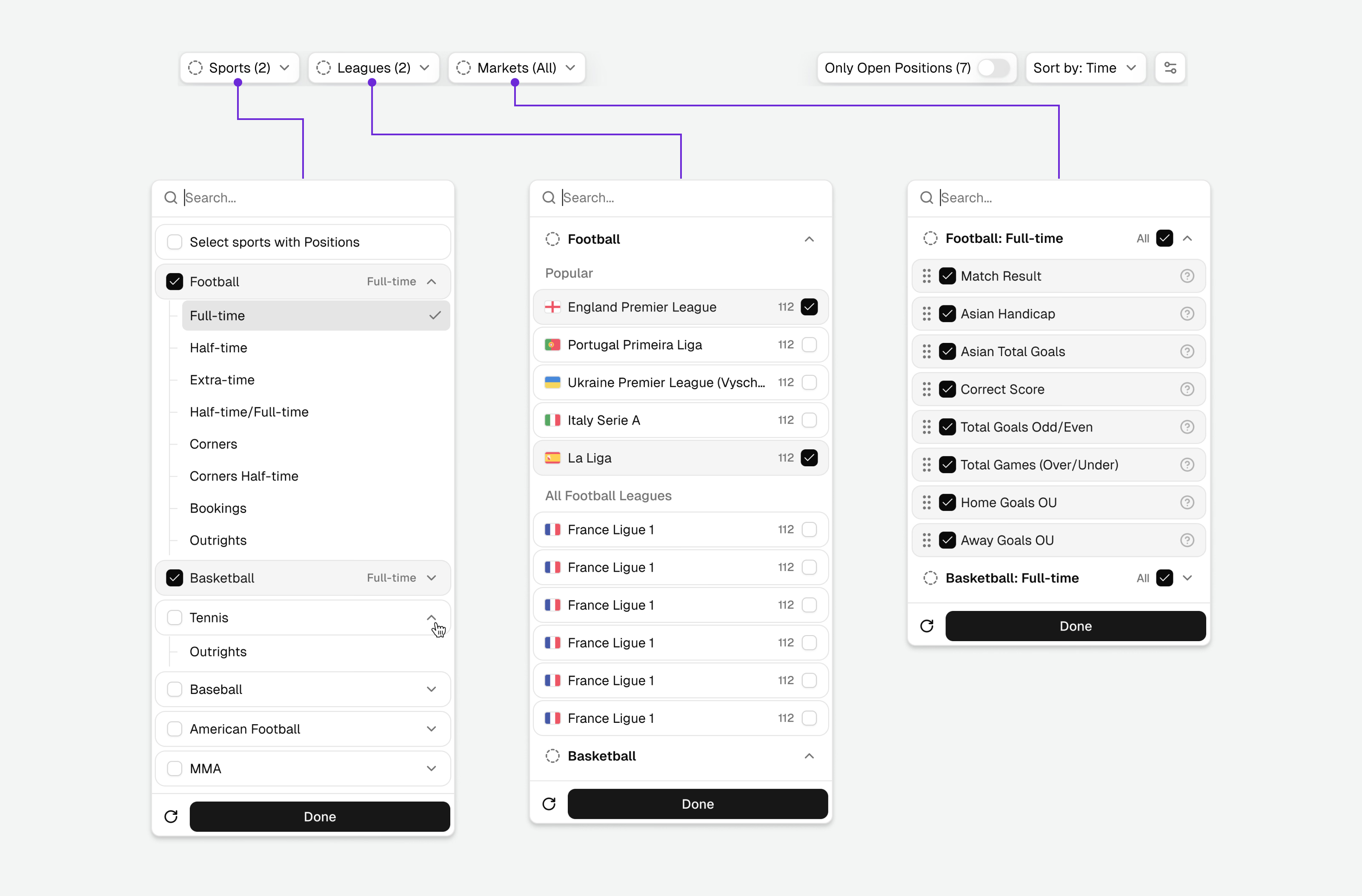
- Selection: sports, leagues and markets, each in its own dropdown with search. The leagues and markets lists only show the sports the user has selected, so each step narrows the next.
- Time grouping: All, Live, Today and Upcoming.
- Sort order: by start time, or by sport and league, where the list is grouped first by sport, then by league, then by time.
- Pro filters explored in the wireframes: odds gap between outcomes, liquidity per price and odds movement over a chosen period.
Two behaviours made the settings feel light. Quick changes through the dropdowns save automatically to the current workspace, so the user never loses work by navigating away. A reset returns all filters to their defaults in one step.
The wireframes also recorded what didn't fit. Filters in the sidebar left room for only one market at 1440 pixels, because every outcome on an exchange carries two prices, Back and Lay. Leagues risked becoming a mess, which led to the sort by sport and league. And some filters, such as odds gap, were hard to apply across all markets at once. Saved views don't remove these problems; they force a team to decide them explicitly.
How Should Users Create, Switch and Delete Workspaces?
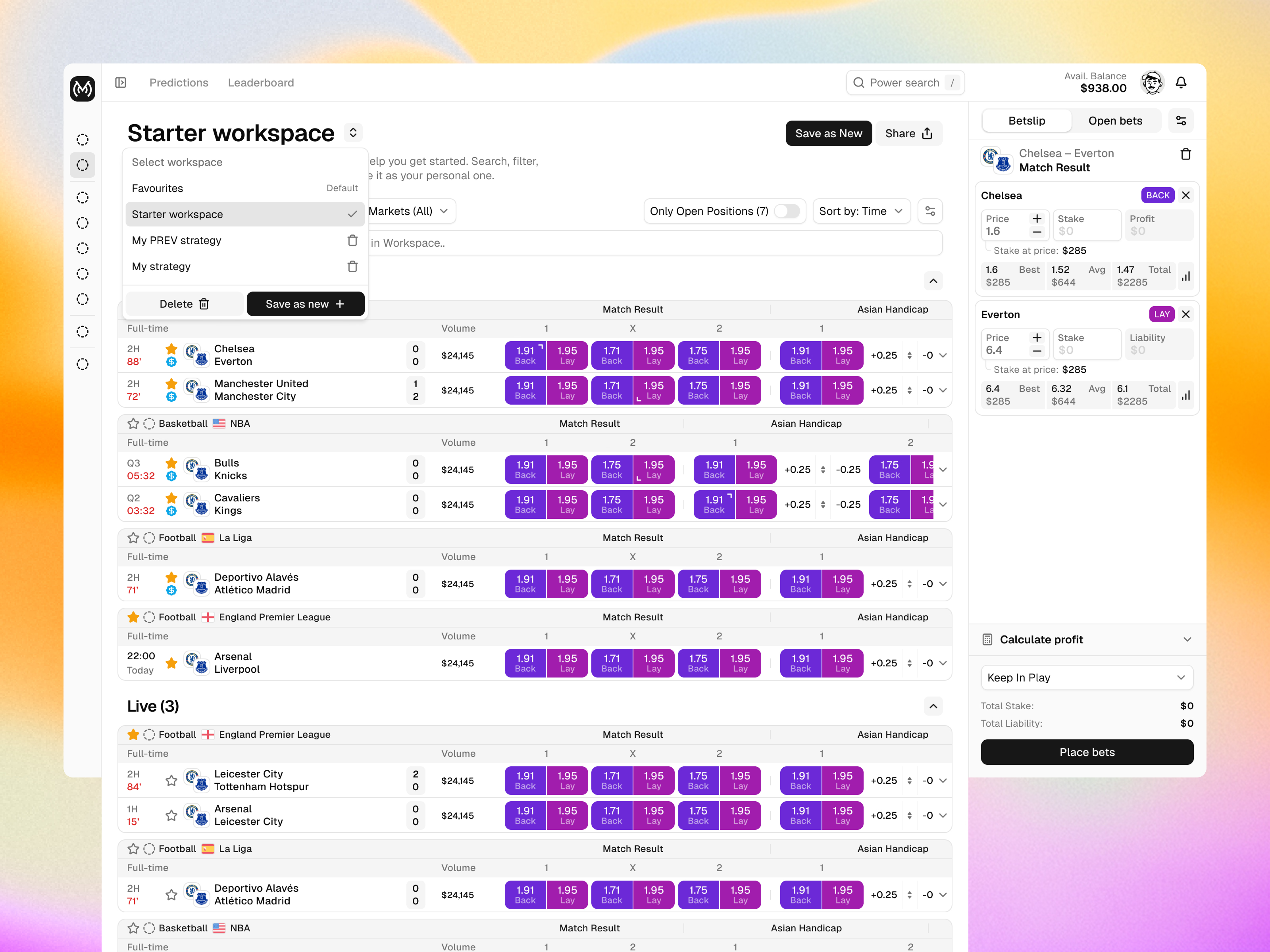
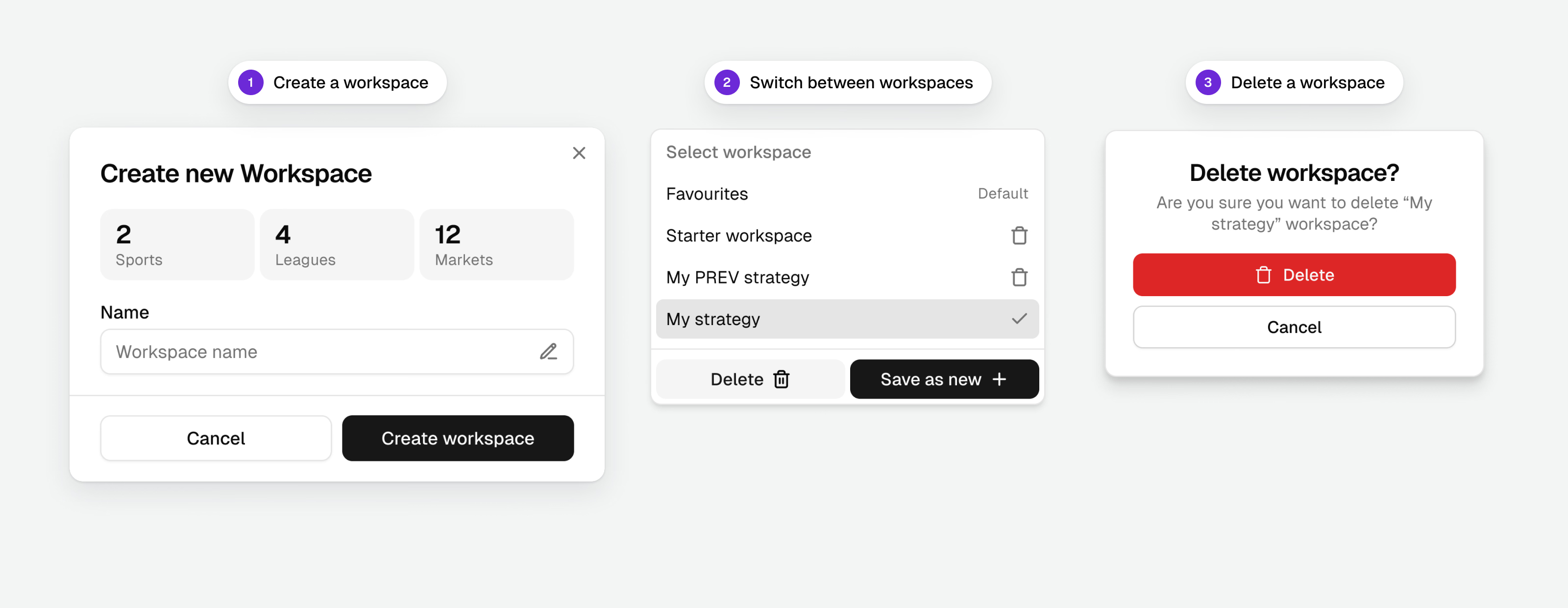
By saving what they already see. The most natural moment to create a workspace is right after a user has adjusted one and likes the result. In the Magic Markets design the Save as New button sits in the workspace header; the dialog shows how many sports, leagues and markets the new workspace will hold and asks only for a name.
Switching happens from a selector on the workspace title, which lists Favourites, the Starter workspace and every saved strategy. Deleting a workspace asks for confirmation and names the workspace being removed.
Our power-user flow described the goal behind this: let long-term users run several strategies side by side, one for low liquidity, one for the NBA, one for odds gaps, and move between betting styles without rebuilding anything. Creation was available from every place a user filters: Top Events, Favourites, an existing strategy, or the plus button in the workspace area.
How Do You Show Live State Inside a Saved View?
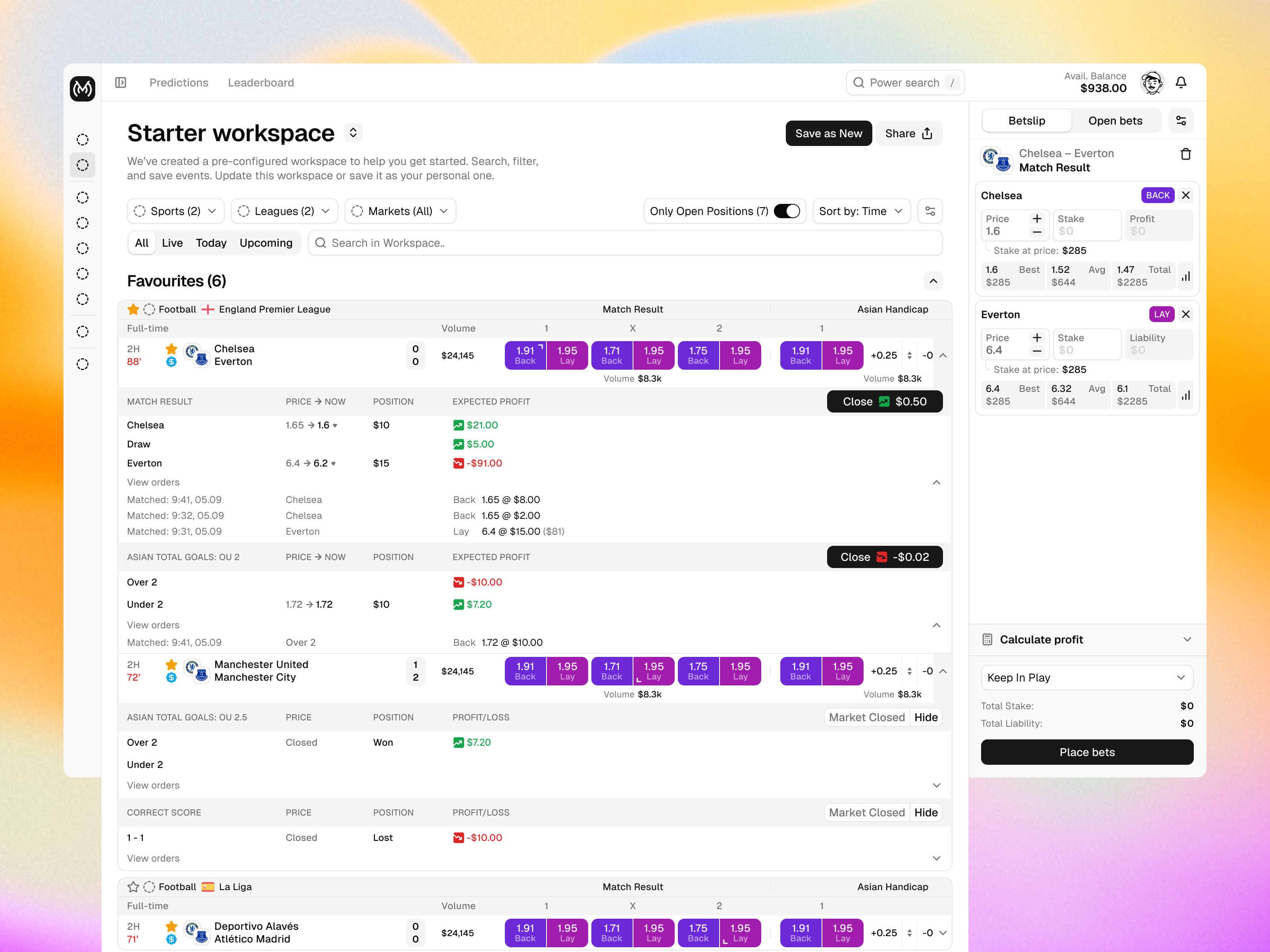
Inside the list, where the user already looks. A saved view that only filters static data misses the reason a trader comes back: something changed. In the Magic Markets design, events where the user holds a position carry a marker in the row, and an Only Open Positions toggle reduces any workspace to those events, with each position expandable to show price then and now, stake and expected profit.
Favourites behave the same way. A starred event appears in any workspace whose filters it matches, so the user doesn't need to check two places.
Can a Saved View Teach the Product?
Yes, and this is the main reason we believe workspaces could have been the killer feature of Magic Markets. A workspace is built from filters and data the user already understands. Around them sit filters the user doesn't know yet. Switching one on and watching the list change explains that filter faster than any tooltip.
That makes a workspace a learning tool. A newcomer can create a workspace just to experiment, try odds movement or liquidity filters on familiar matches, and delete it afterwards. A pro can build three strategies in a few minutes. And because workspaces extend a concept every bettor already knows, favourites, there is little new vocabulary to learn.
Templates push this further. Each ready-made workspace shows a filter combination in use, with real events, and invites the user to copy it and change one thing.
What Happens When Stakeholders Say No to Your Best Idea?
Sometimes they say no, and the reasons are reasonable from their side. The Magic Markets team chose a familiar sportsbook structure for launch, and workspaces weren't put into testing. A new product in a crowded market has to earn trust, and looking like what users already know is one way to do it.
We still think workspaces were the right idea, and we'd argue for them the same way again. Looking back, three things would have given the idea a better chance:
- Propose the smallest test. One workspace beyond Favourites, behind a flag, for a share of returning users. Measure whether they come back to it.
- Lead with the familiar part. Presenting workspaces as "favourites with filters" lowers the perceived risk more than presenting them as a new concept.
- Show a template on real data. A ready-made workspace for one popular league makes the value visible in seconds.
The broader lesson for design teams: an idea the team believes in deserves a test plan alongside the design. A rejected concept with a clear, cheap way to validate it often comes back.
In Short
Saved views are easy to dismiss as a settings feature. Designed as workspaces, they become the place users work, the way they learn the product and the reason they come back.
Building a data-heavy product your users open every day? Our sports analytics product design work starts with how people actually move through your data, and a product audit is the quickest way to find out where your users rebuild the same view every day. For the market itself, see our articles on betting exchange UX and sports prediction market UX. Let's talk.

Frequently Asked Questions
What is a saved view in UX design?
A saved view is a named combination of filters, sorting and layout that a user can open directly. In data-heavy products it becomes the main working surface. In the Magic Markets design, saved views took the form of workspaces, each holding its own sports, leagues, markets and sort order for a specific trading strategy.
What is the difference between a saved filter and a workspace?
A saved filter stores one query. A workspace stores a whole context: selection, grouping, sorting and the live state inside it, such as open positions. The Magic Markets design used both, with presets acting as quick filters inside a workspace and global presets working as templates across the product.
Should a new user start with an empty saved view?
No. An empty view asks a newcomer to configure a product they don't understand yet. Start with a working template and a favourites view that can't be deleted. In the Magic Markets design every account began with a preconfigured Starter workspace, so new users would see real events before changing any setting.
How many saved views should a product allow?
Enough for the number of distinct tasks a user runs. In the Magic Markets design, traders were expected to keep a few strategies, for example live liquidity, one league and odds gaps. Unlimited views are fine if switching is one click and deleting is easy, but two default views cover most new users.
How do you convince stakeholders to test a new feature?
Propose the smallest test that answers the real question: one extra saved view behind a flag for some returning users, measured by whether they come back to it. Present the feature through something familiar, such as favourites with filters, and show it working on real data before asking for a full build.
