





Betting Exchange UX: How to Design a Product as a Decision Tool





Written for founders and product leads building betting exchanges, sports trading platforms or any betting product people open to decide rather than to play.
Betting exchange UX is the design of products where users trade on an order book against each other, with no bookmaker setting the price. It covers how prices, liquidity, orders and positions are shown, and how one market serves both the people who set prices and the people who take them. This article uses Magic Markets as the working example.
Most consumer betting UX is built around activity. Find an event, open the markets, place a bet, move on to the next one. The shorter that path, the better the product is doing.
A betting tool works the other way round. People open it to compare prices, watch how a market moves or manage a position they already hold. A good session can end without a bet at all, because the price moved, the volume wasn't there or another outcome looked better.
An exchange adds a second layer of difficulty. On Magic Markets, a sports prediction market with an exchange order book that we have helped shape since 2025, some users wanted to set their own prices and supply liquidity, while others simply wanted to accept a price and bet. Both behaviours had to work on the same market, and that requirement shaped the product's architecture more than any visual decision.
Magic Markets is now live at magicmarkets.com, where the team keeps testing different approaches with real users. The launched product differs in places from what is described here: this article covers the architecture and design directions we developed together, including ideas that were explored and not shipped. Three labels mark status throughout the series: Live product for what runs on magicmarkets.com today, Design exploration for directions we designed and compared, and MVP direction for what we proposed for the first release.
TL;DR
- A betting tool is judged by the quality of the decisions it supports rather than by how quickly it leads to a bet.
- On an exchange, the first design question is what the user does with the market: accept an available price, or set their own and supply liquidity.
- The same person can do both within a minute, so makers and takers can't be split into a "pro" app and a "casual" one.
- Expertise is the second question: how much information, control and explanation each user needs on the same market.
- A best price means little without the volume behind it, so price and liquidity belong together on screen.
- Saved workspaces and a framing choice at onboarding (exchange or prediction, odds or probability) let each user shape the same market around how they trade.
How Is Betting Exchange UX Different From a Sportsbook?
A traditional sportsbook is organised around events. The user picks a sport, finds a match, explores its markets and places a bet at the bookmaker's price. When the task is taking part in an event, that structure works well.
An exchange works differently. Prices are set by other users, they move with supply and demand, and a bet can be matched in full, in part or not at all. The user isn't just choosing an outcome; they are dealing with a market.
Picture two people interested in the same football match. One wants to back the home side: they need a clear event page and a short path to the betslip. The other wants to understand how the market prices different outcomes, follow probability changes and decide whether the current price is worth acting on. They need market data, historical movement and a way to compare outcomes. Both are looking at the same event, but they're trying to accomplish fundamentally different things.
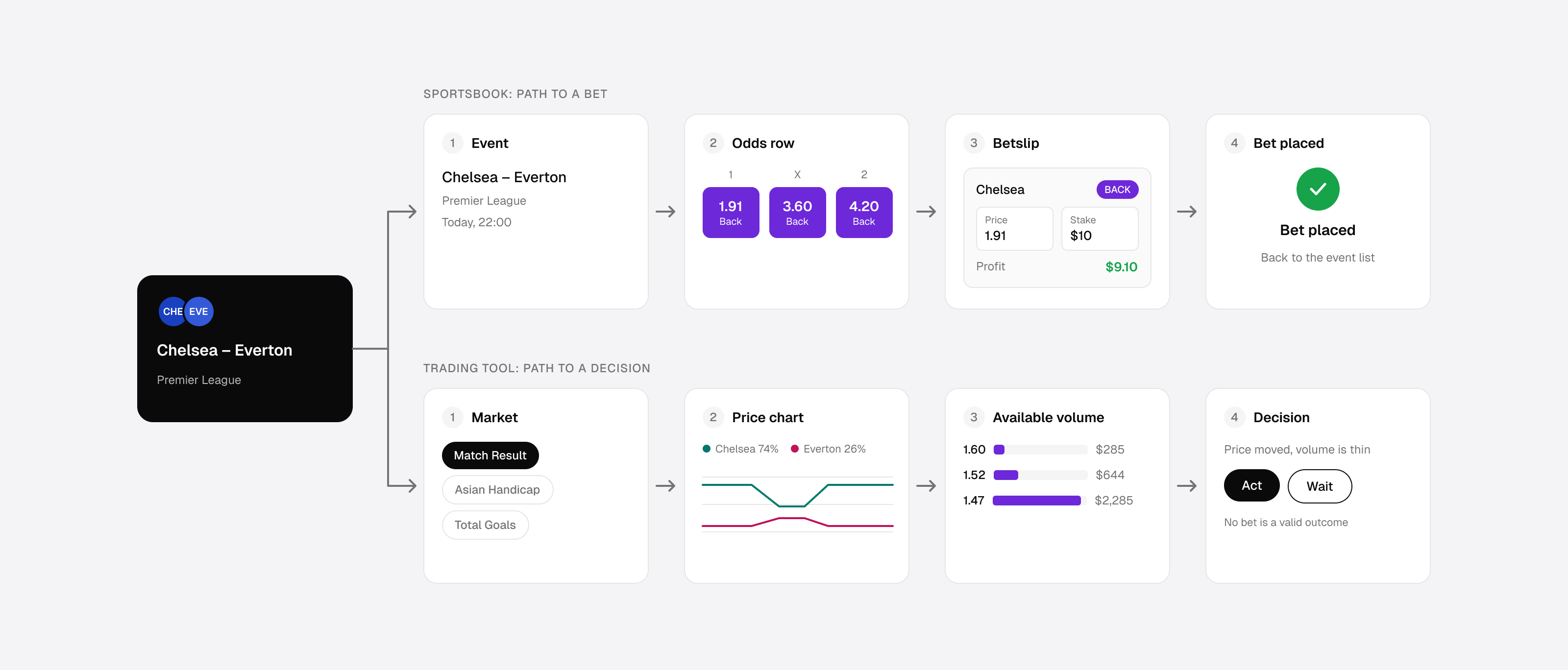
Entertainment and utility optimise for different things
The difference shows up in choices that look minor. An entertainment-led product puts popular events and featured markets first and uses motion to add atmosphere. A tool remembers the user's criteria, puts current and relevant data first and uses motion mainly to show that something has changed. Its language is precise rather than promotional, because users are interpreting numbers rather than reacting to them.
Success is measured differently, too. A sportsbook funnel tracks how efficiently users move towards a bet. A tool also has to ask whether users found what they needed, understood it correctly and could act on it with confidence.
Can the user complete a meaningful decision without placing a bet? If every journey pushes towards the betslip, the product is treating an analytical task as a conversion funnel.
One Market, Two Behaviours
The first question in designing an exchange is what the user needs to do with the market. How experienced they are comes second.
A sportsbook has one kind of customer: someone who accepts the bookmaker's price. An exchange has two sides. Some users make the market: they set their own prices and supply liquidity that others can trade against. Others take it: they find an outcome, see the best available price and accept it.
Market makers need professional trading tools:
- Price setting. Placing limit orders at a price they choose, with no obligation to accept what's offered.
- Liquidity. Offering volume that other users' bets can be matched against.
- Market depth. Seeing how much is available at each price.
- Order management. Tracking unmatched and partly matched orders, changing and cancelling them.
- Position management. The overall position on a market, with potential profit and loss.
- Hedging. Reducing risk by taking the opposite side or closing a position.
Market takers need something far simpler: discover an event, select a market, choose an outcome and place a bet. They don't have to read the full order book to do it. The exchange matches their bet against the available liquidity, subject to the prices and volumes other participants are offering, and the interface can show as little or as much of that as the user wants.
Roles rather than personas
This distinction runs deeper than pro versus casual. Expertise describes how someone wants to use the interface. Maker and taker describe a role in a single transaction. And roles aren't tied to people: a professional trader can post a limit order, supplying liquidity, and a minute later accept someone else's price.
That rules out the obvious design of one "pro" app for makers and one "casual" app for takers. The professional interface has to let users both make and take. The simplified one can hide most of the exchange mechanics while working with exactly the same market.

Magic Markets had to make the same market work for two fundamentally different behaviours: creating liquidity and taking it. The design challenge was to make the exchange's complexity available to professionals without imposing it on everyone else.
Only once those interactions are clear does expertise become the next question: how much information, control and explanation each user needs. In Magic Markets the two dimensions shaped the architecture together, and the rest of this article follows them through the product.
Why Isn't Sportsbook Navigation Enough for Trading?
A sportsbook can treat a market as a row of odds inside an event. For a trader, the market itself is the workspace: price, probability, available volume, movement over time, and the trader's own orders and position all belong together.
Market-in-focus
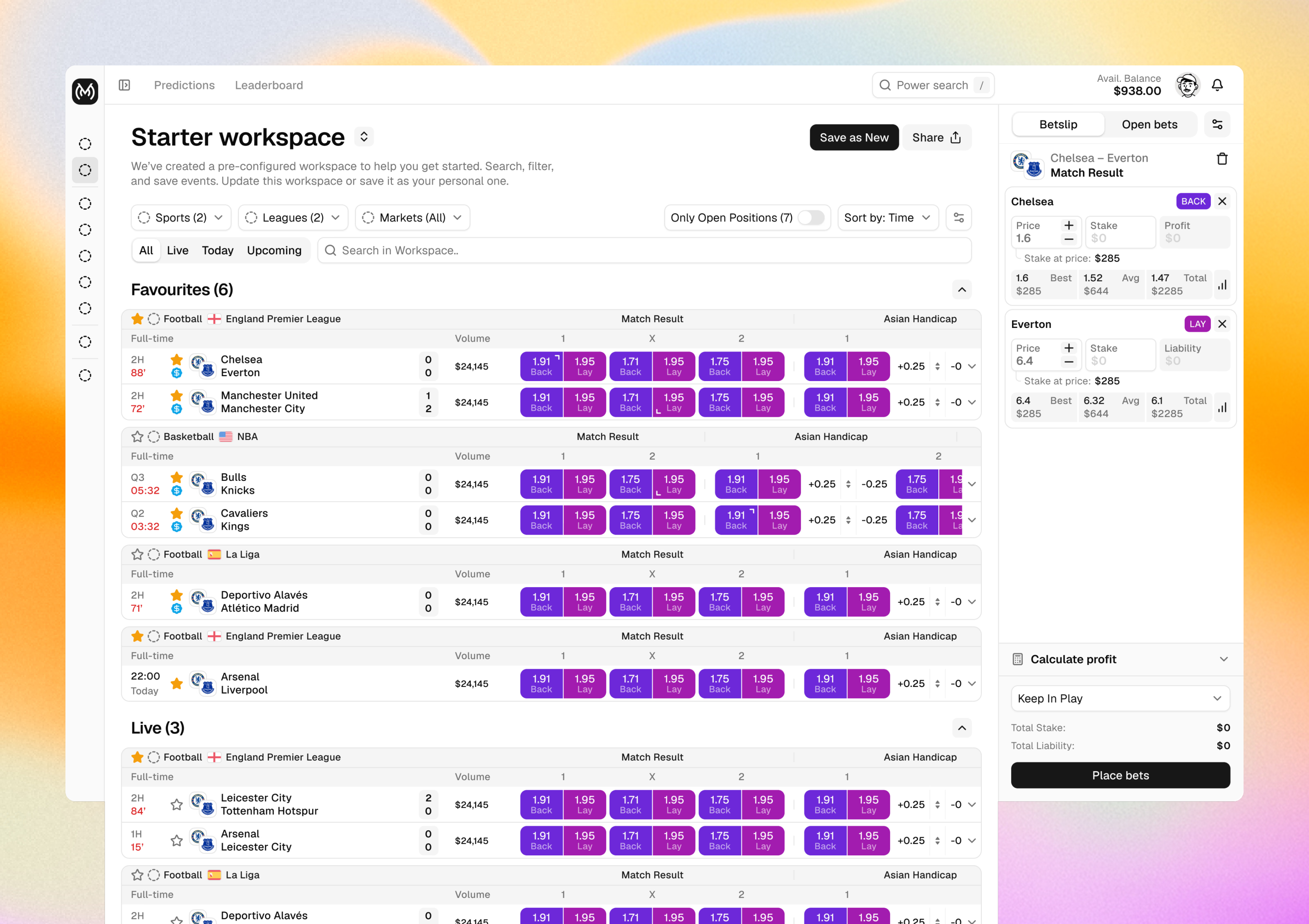
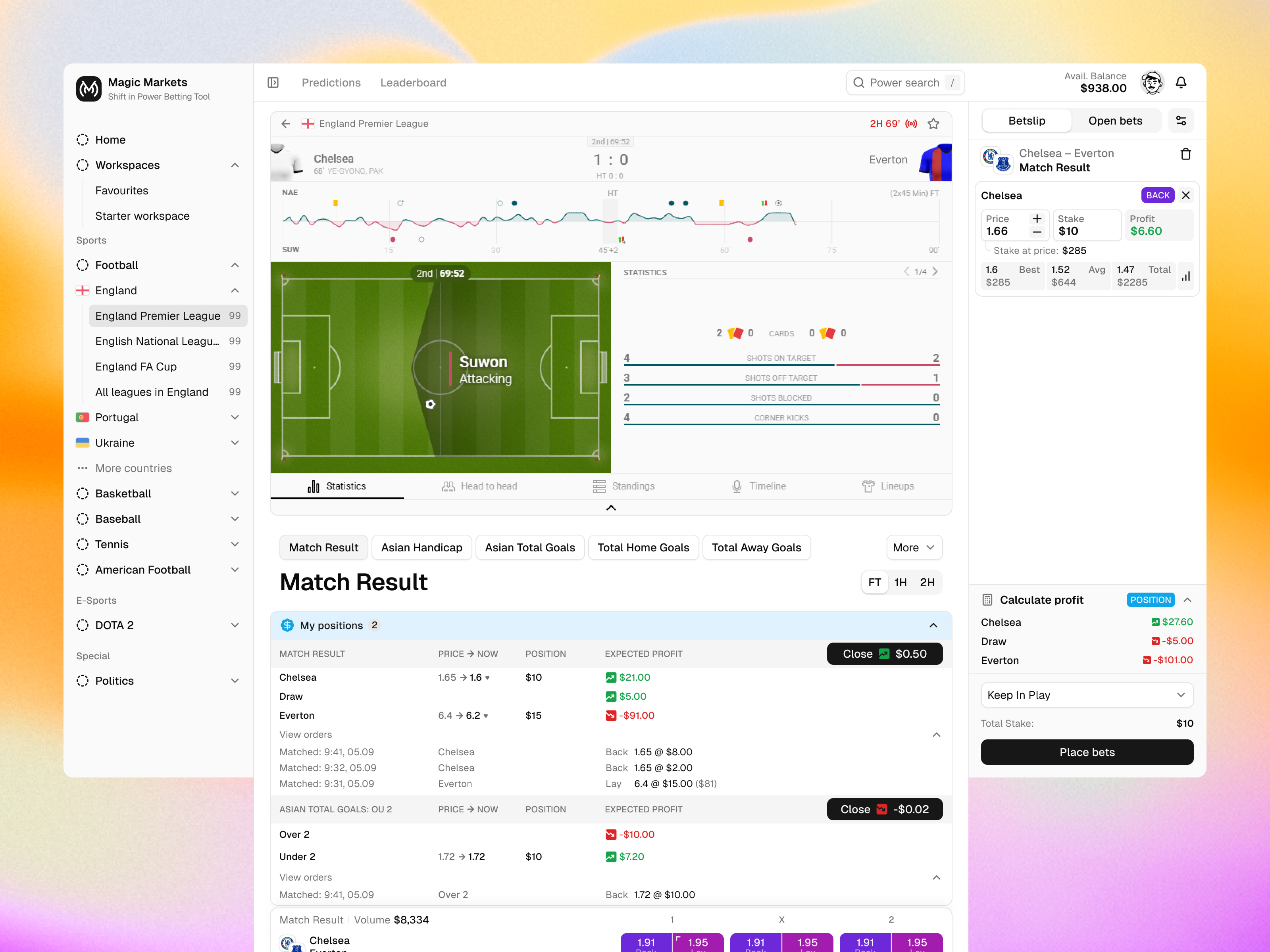
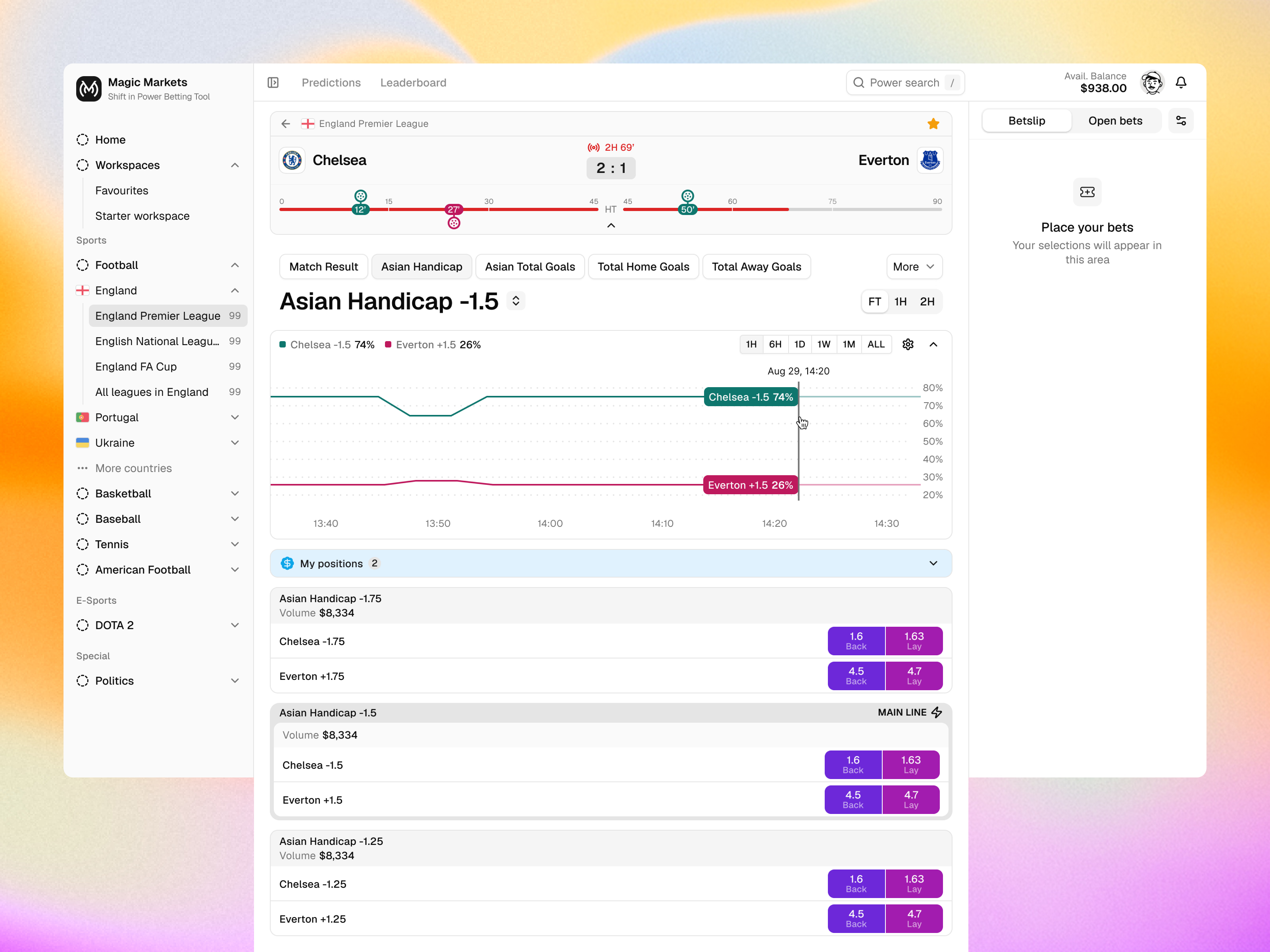
In Magic Markets we explored a market-in-focus event page. The user selects one market and it becomes the centre of the screen, with room to analyse it and act on it, while the event's other markets stay one step away in a compact selector. The user can move between outcomes, follow probability movement and return to an earlier selection without losing their place.
Price and probability as the interface
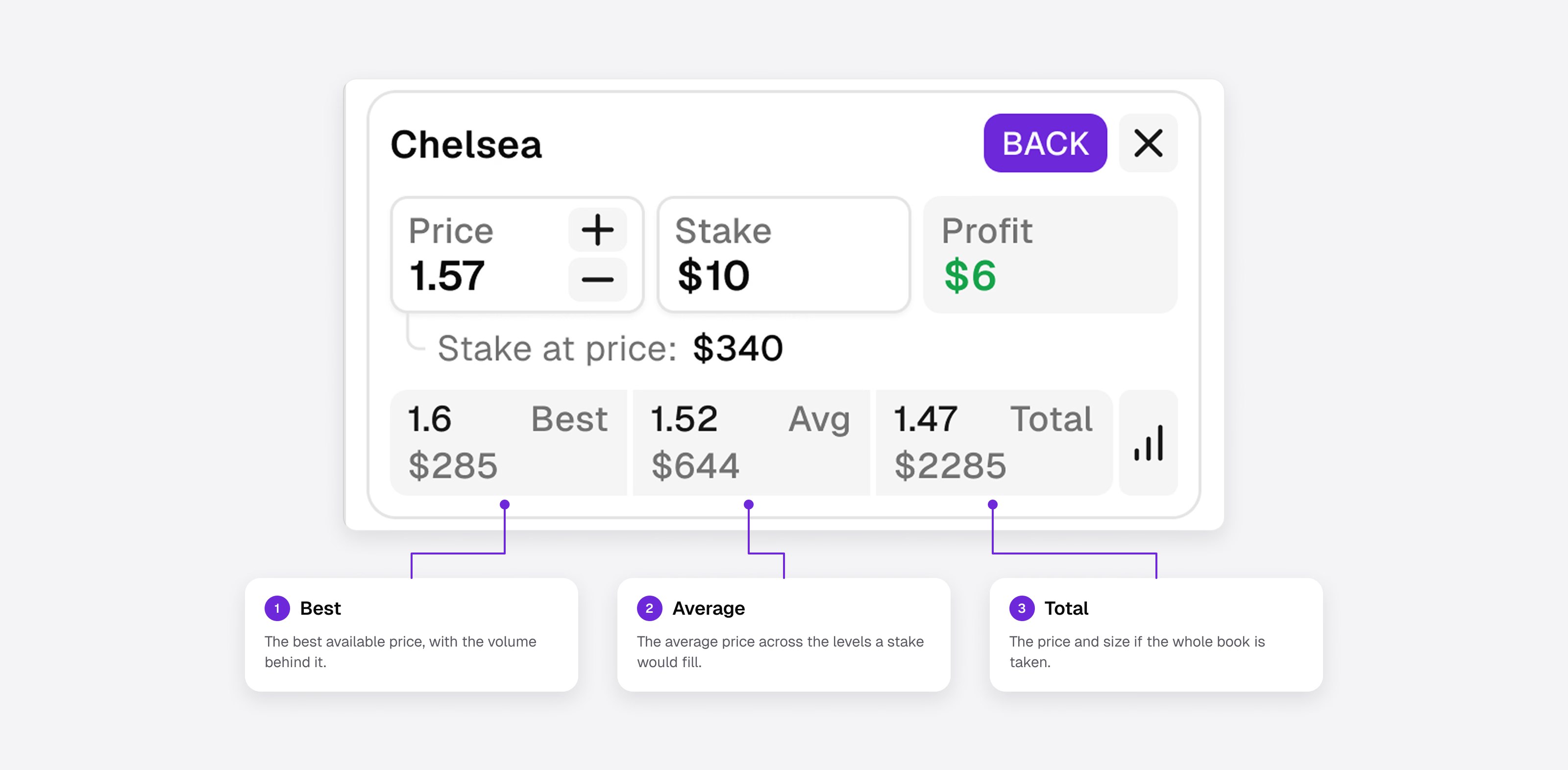
On a trading screen, price, probability and their movement are what the decision rests on, so they belong in the main view rather than in a side panel of supplementary analytics: odds-linked charts that follow a specific market and outcome rather than the match in general, and a compact liquidity summary (best price, weighted mean price and available volume) with fuller depth on demand.
Why one best price isn't enough
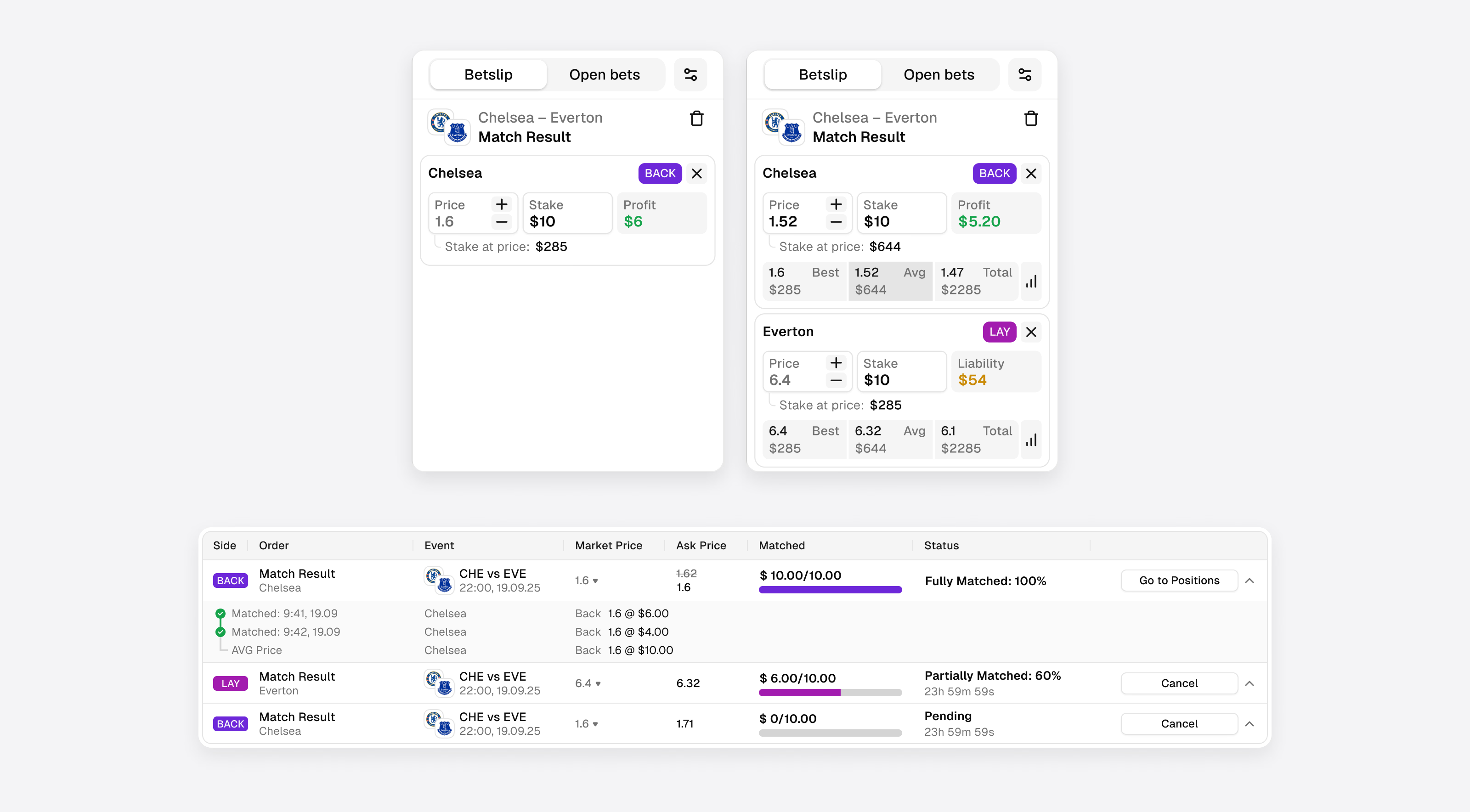
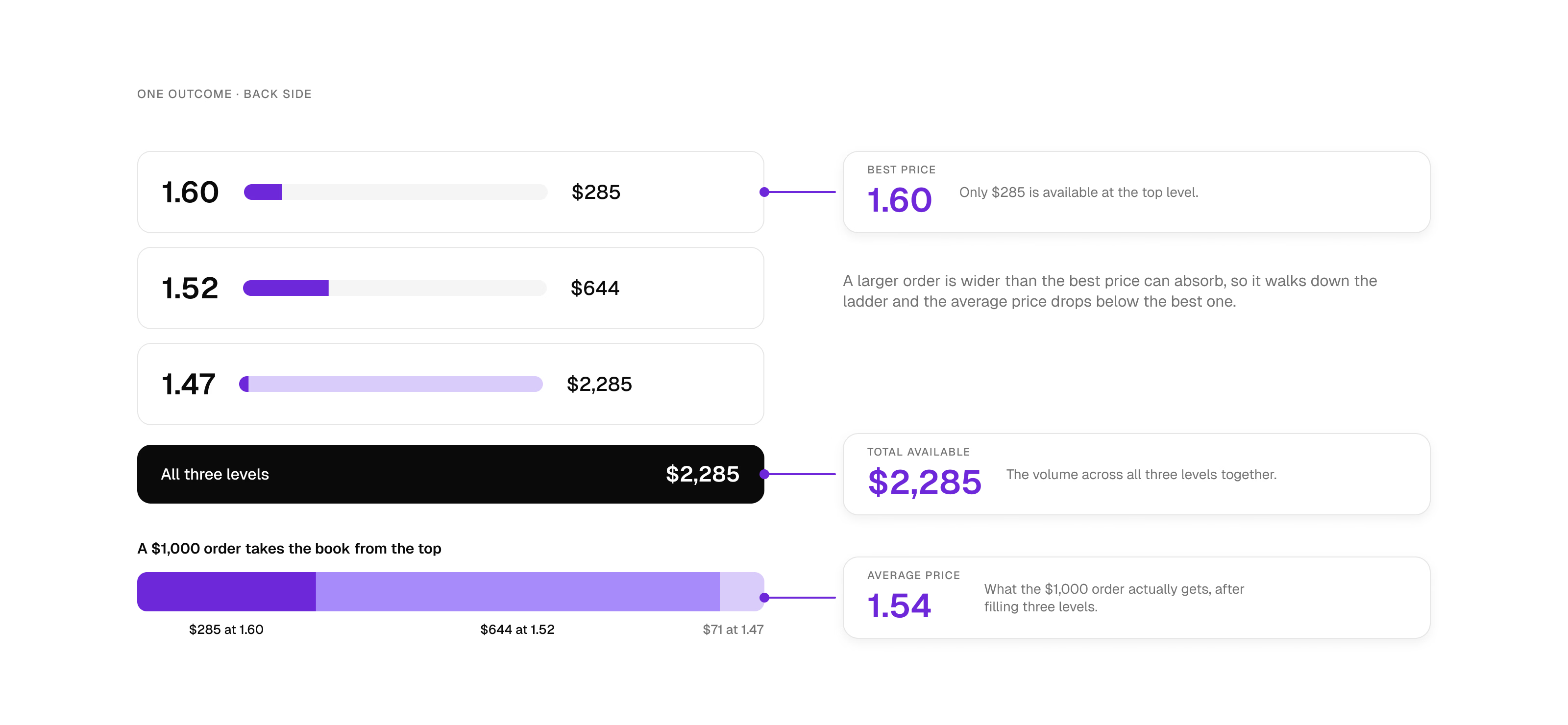
The best available price tells a trader where they can start. It doesn't tell them what price they will get for the full amount they want to trade. An attractive price backed by very little volume can be worth less than a slightly worse price available at the size they need.
That is why we explored placing the liquidity summary next to the price, in view before the order goes in. Market information can't be reduced to a single prominent number.
Event, market, orders
A trader's holdings are a hierarchy, and the interface should read the same way: the event for orientation, the market for exposure, the individual orders for what actually matched. Magic Markets grouped positions in exactly that order, so a user can read from net exposure down to each fill. A flat list of bets can't show those relationships.
How Do You Show the Same Market to Different Levels of Expertise?
Maker and taker describe what someone is doing in a transaction. Expertise describes how deeply they want to engage with the market at all. And simplicity isn't a fixed amount of information: a newcomer can be lost on a dense market screen, while a professional can be slowed down by a simplified one that hides what they need.
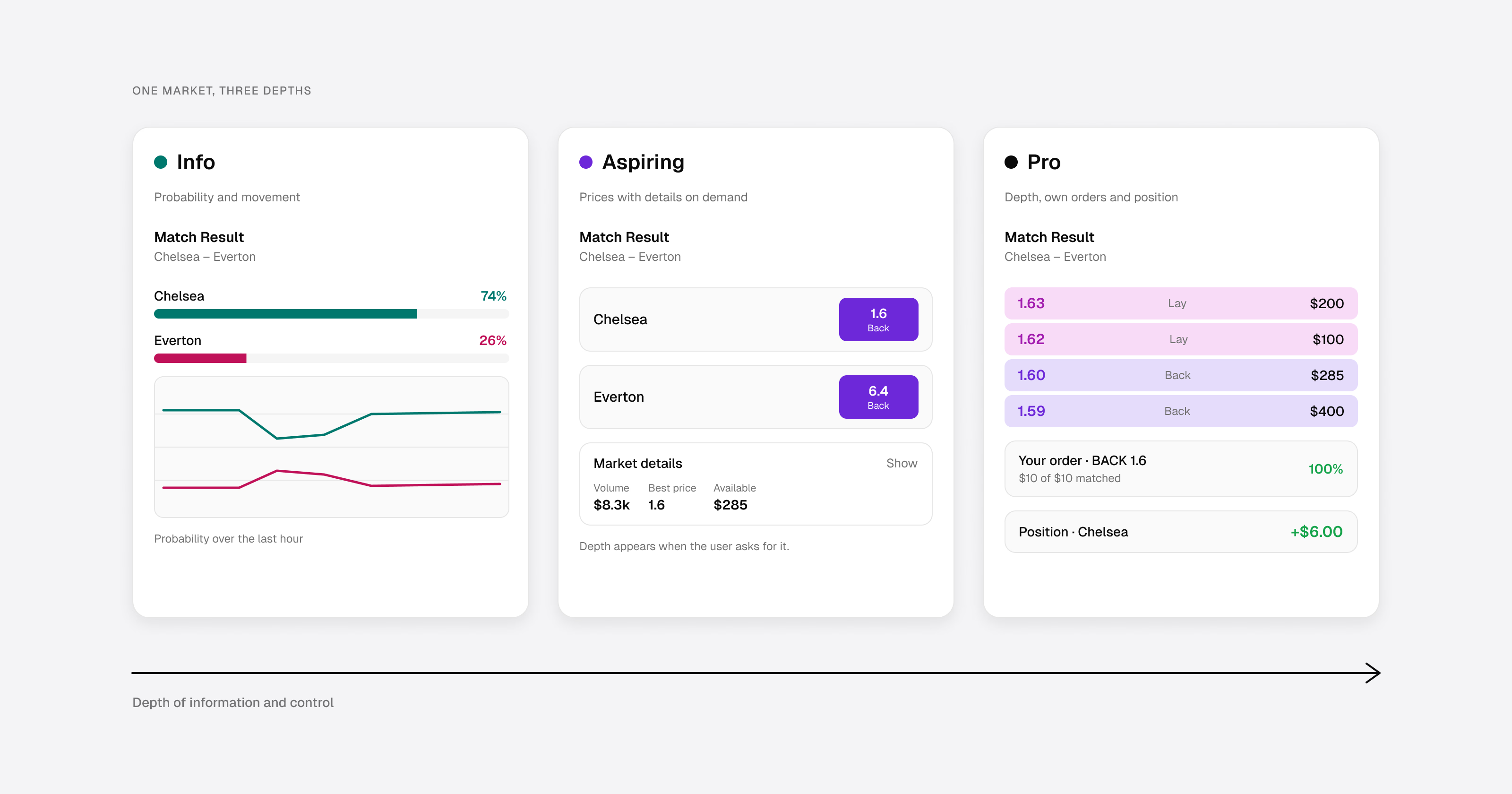
In Magic Markets we explored how the same market experience could accommodate three levels of expertise.
Pro: the full workspace. Experienced users, often the ones making markets as well as taking them, need depth, their own orders and position, and controls kept close together. Explanations they don't need become friction; stable navigation and persistent preferences matter more.
Aspiring: depth when it becomes useful. These users understand the basic task but don't yet know which advanced controls matter. Showing everything at once overwhelms them; removing advanced tools frustrates them as they grow. Progressive disclosure fits here: essentials first, then specialised tools when they become relevant, such as expandable market details, optional panels and explanations attached to the concepts they explain. The basic task should never require configuring the whole system first.
Info: translation without distortion. Some users are curious about how markets behave without knowing how traders talk about them. For them, a probability can read more clearly than an odds format, a chart of probability movement more clearly than a price table, and buy/sell or yes/no more clearly than back/lay, where the underlying mechanics genuinely support that translation. Buy and sell are not always equivalent to back and lay, and simplifying the words must never change what the market means.
Why one shared market
Another way to serve different audiences is to give them separate entry points: a sportsbook-style front door for casual users and a professional workspace for traders. Magic Markets explored the opposite: one shared market experience with layers. Makers and takers trade against each other on the same market, and the same person can move between both roles, so splitting them into separate products would have worked against the mechanics the exchange depends on.
The hard part was deciding what belongs in the shared layer: what every user sees about a market, and what appears only when someone asks for it.
Serving Pro, Aspiring and Info users on one market is a large part of what made the Magic Markets architecture complex, and not every journey belonged in the first release.
How Do Workspaces Let Each User Build Their Own View of the Market?
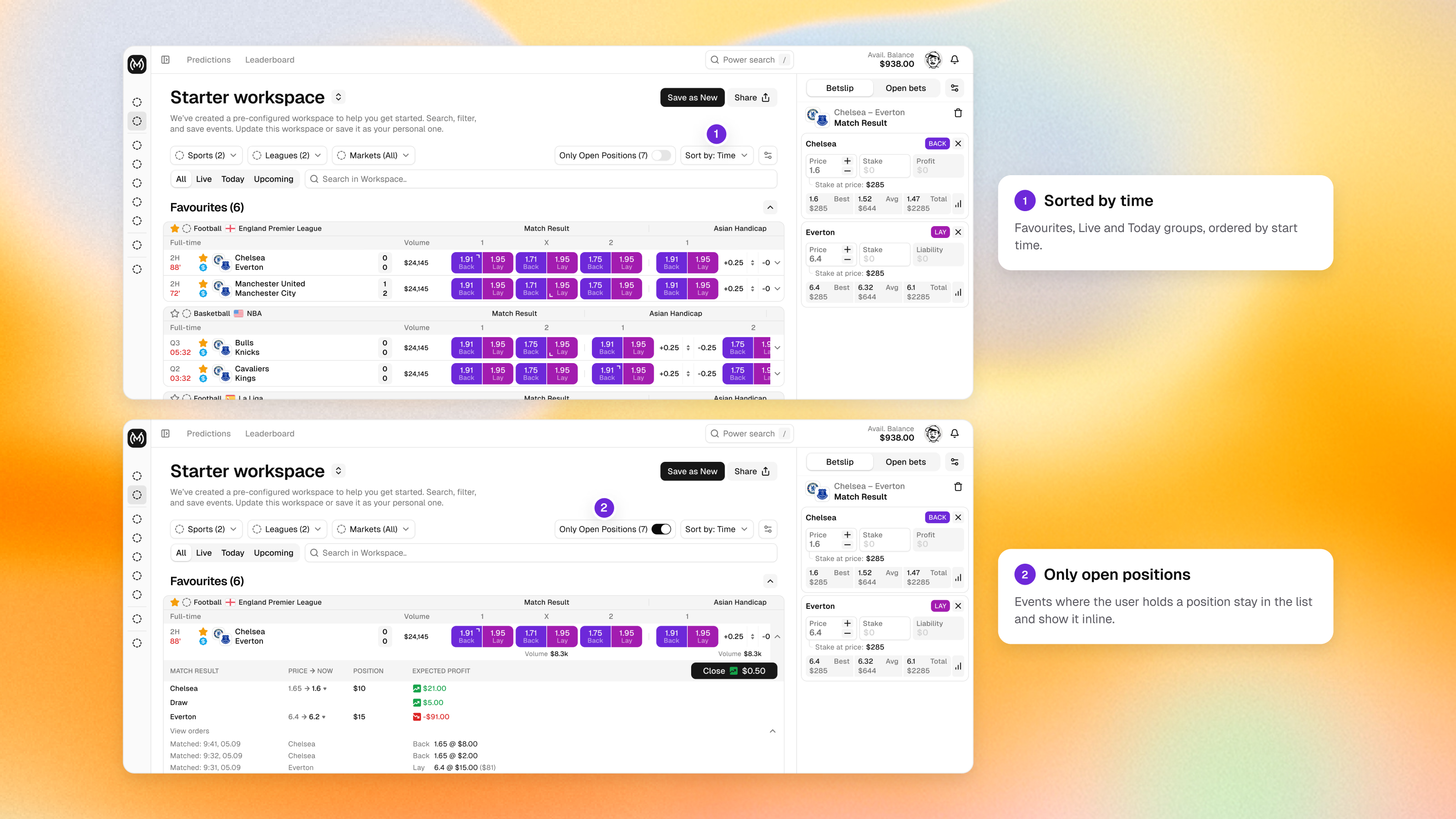
Design exploration. Expertise explains how deep someone wants to go into one market. It says nothing about which markets they want to see, and a sport and league tree makes every trader rebuild that list each session. Magic Markets answered this with workspaces: saved views of the market, each with its own sports, leagues, markets, time grouping and sort order, switched from one selector. Every account started with Favourites, which can't be deleted, and a preconfigured Starter workspace, and any edited view could be saved under a new name. Events where the user holds a position were marked inside the list, so monitoring happened where browsing did.
The launched product didn't take this direction, and we still consider it the strongest idea in the project.
How Do You Let Users Choose Between Exchange and Prediction Framing?
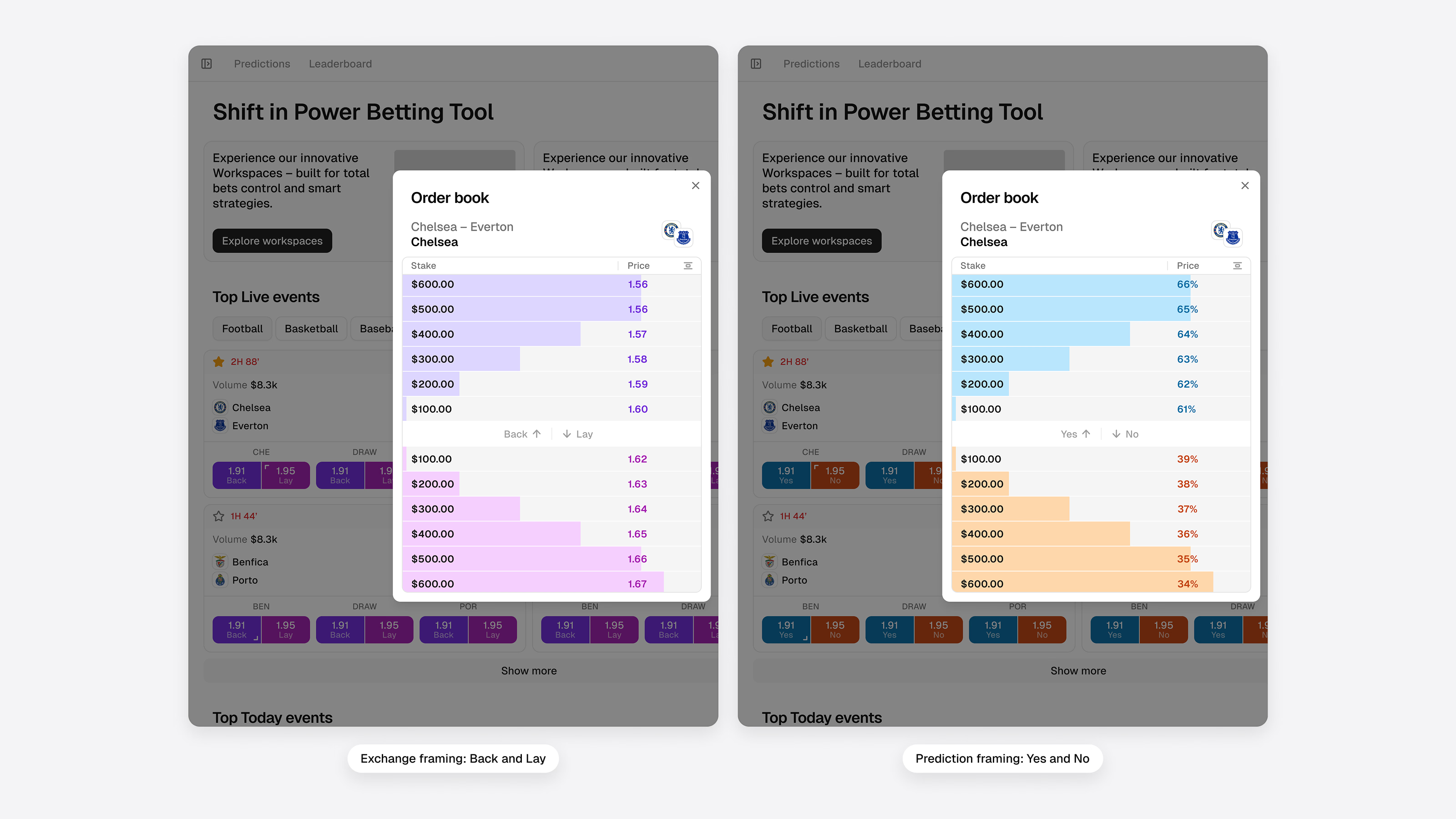
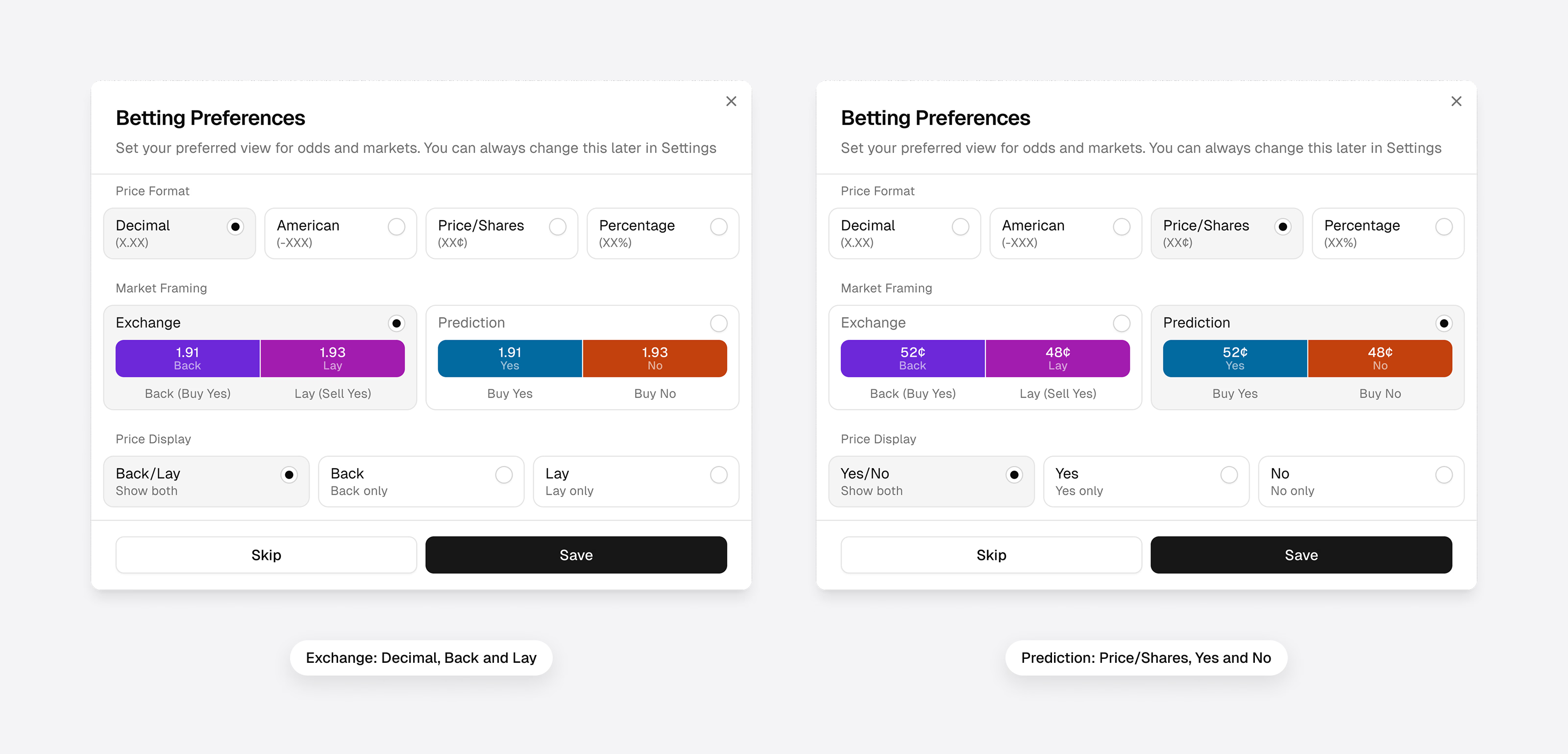
Design exploration. Prediction markets taught a new audience to read a price as a probability and trade Yes or No; exchange users read the same market as decimal odds with Back and Lay. Magic Markets served both on one order book through a Betting Preferences dialog at onboarding, which the user can skip and change later: a price format (decimal, American, price per share or percentage), a market framing (exchange framing with Back and Lay, or prediction framing with Yes and No) and a price display (both sides of an outcome or one). Every screen then renders in that combination while the market underneath stays the same.
The rule from the Info level applies here in full: translation is allowed only where it keeps the meaning. Buying No on an outcome carries the same risk as laying it, but a lay shows liability and a No position shows stake and payout, and those figures have to stay consistent across framings or a user who switches views will think the market changed.
Where Does Entertainment Still Belong?
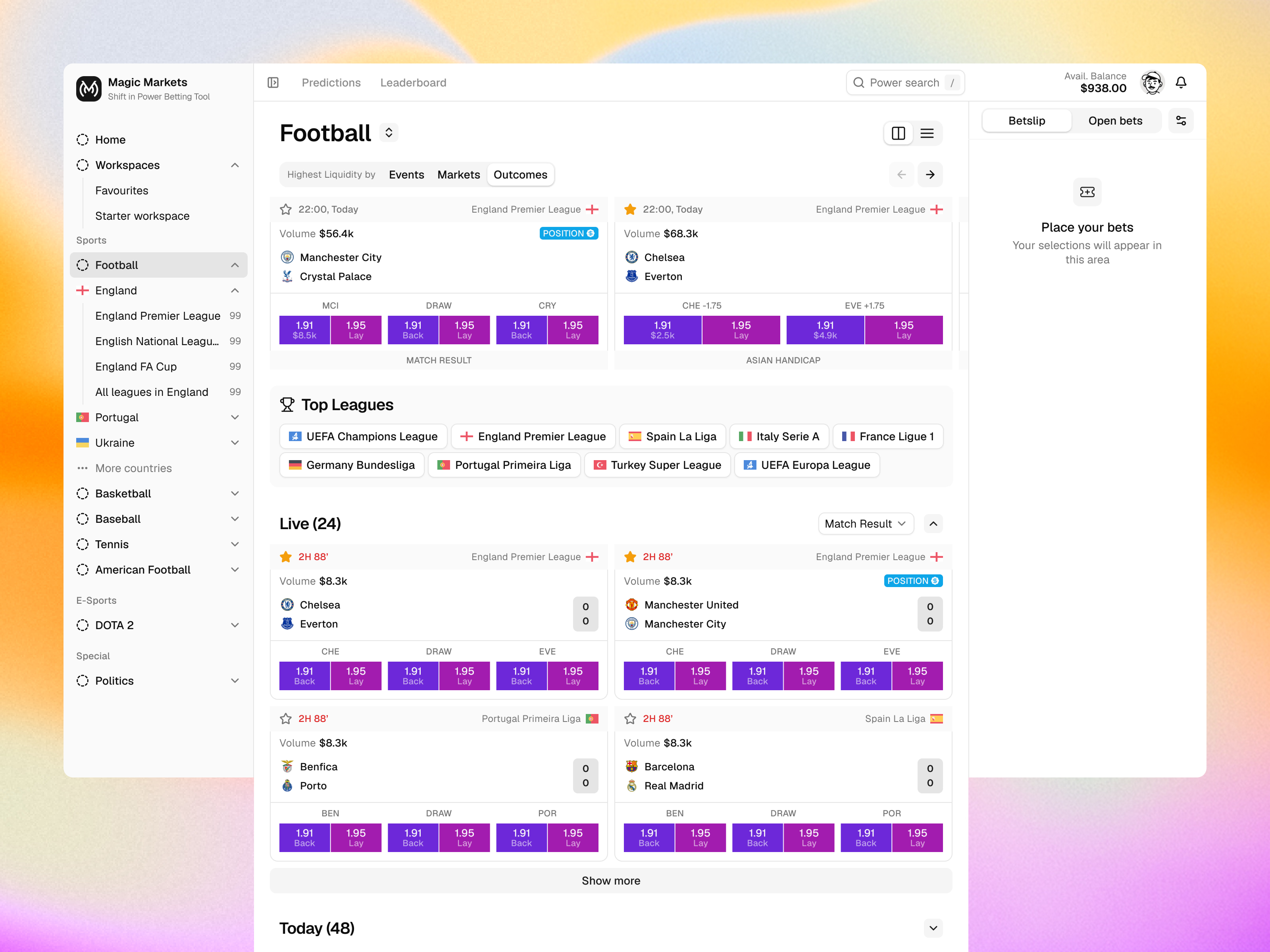
A decision-led product doesn't have to be dry. For Info users, exploring markets is interesting in its own right: following how expectations shift during a match, comparing outcomes, wondering why a price moved. In Magic Markets we explored discovery views built around exactly that curiosity, with a short step from broad exploration to a specific market.
The product can be engaging because the information is engaging. Motion can show how a value changed, a live indicator can show that data is updating, and emphasis can point to a real price difference. The test for any of these is the same: does it help the user understand something, or does it only make the screen feel busier?
How Do You Design for Trust Rather Than Conversion?
On an exchange, trust doesn't come from looking professional. Users trade money on uncertain outcomes, against other people, using prices that can change between reading them and acting on them. Trust is built into how the product behaves.
Be honest about execution. An order can be matched in full, in part or not at all. The interface should make that clear before the user commits and show the outcome plainly afterwards, without implying that a displayed price is guaranteed. Magic Markets showed a matched bar, the average price across fills and the time left on unmatched stake, and let the user decide in advance what happens to the remainder.
Show the risk of a position alongside its potential. Exposure on a market, potential profit and loss, and the effect of closing or hedging should be as easy to read as the price that opened the position.
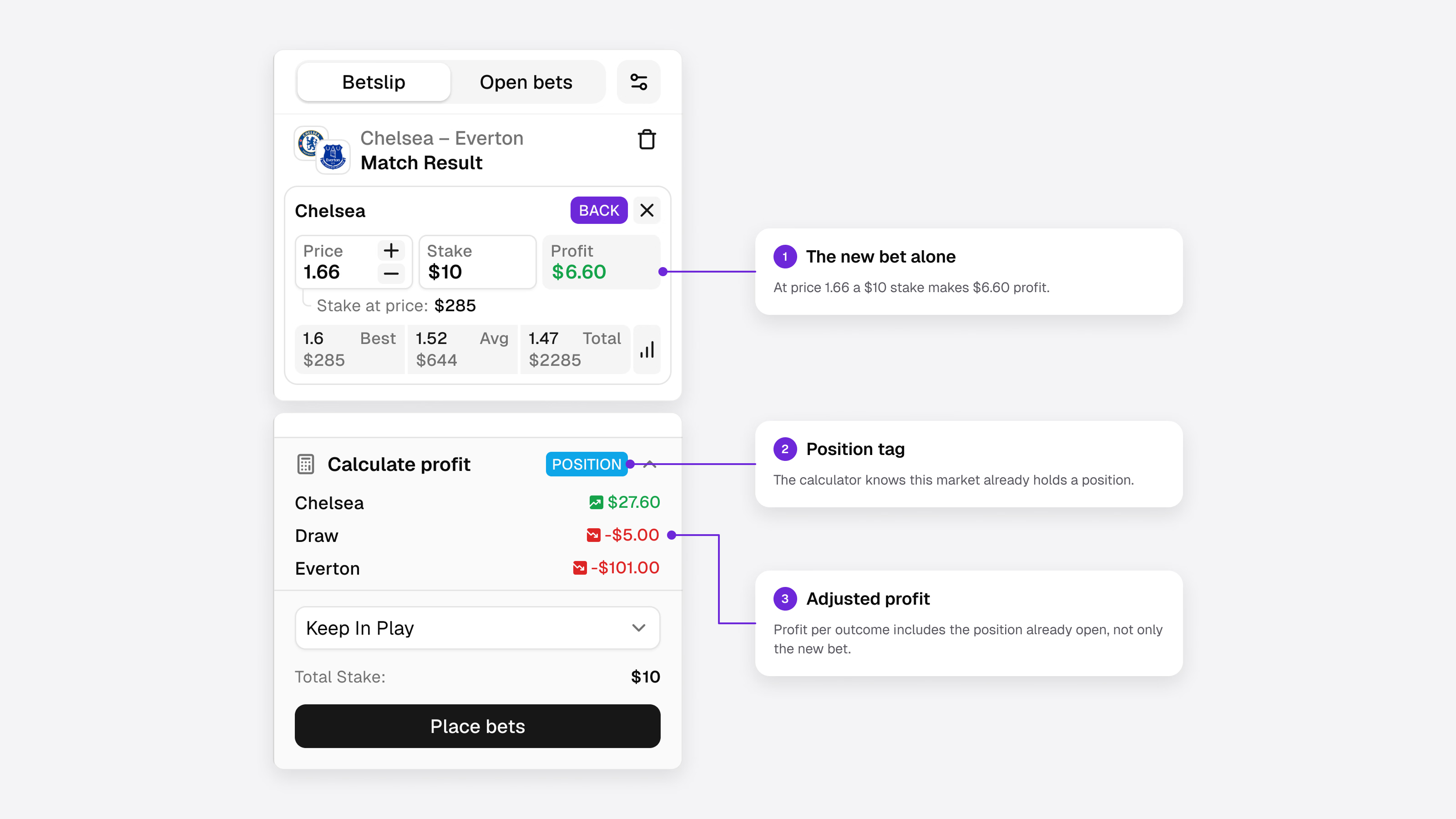
Make freshness and availability visible. Prices move in seconds and liquidity can disappear. Where it matters, show when data last updated. When a market is suspended or a price is stale, say so, and clear the old values from the screen.
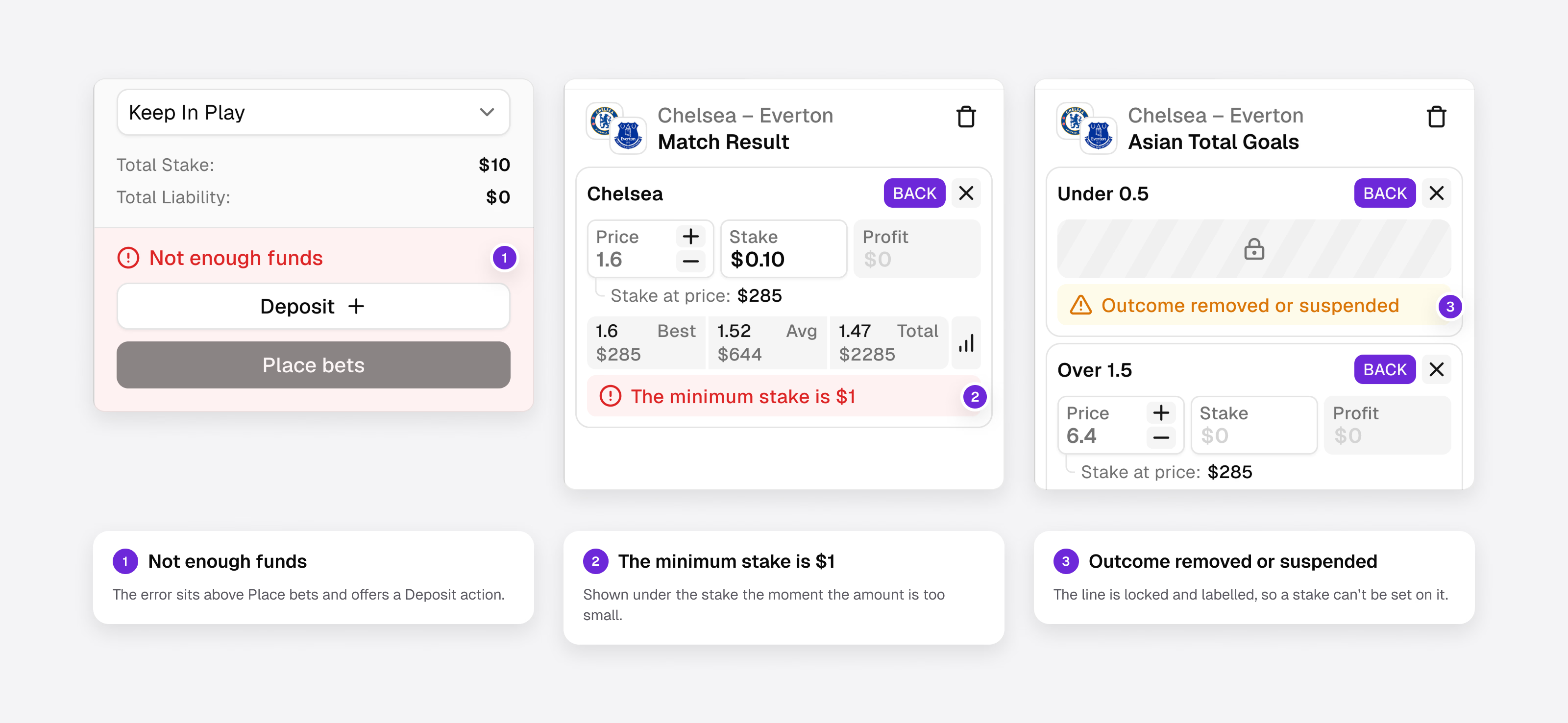
Say what each number is, and keep analysis apart from promotion. A market price, a historical figure and an estimate can look alike on screen; users shouldn't have to guess which one they are reading. And a market highlighted for commercial reasons shouldn't look like the output of analysis.
Checklist: Designing an Exchange Around User Decisions
Before committing to an information architecture, we want clear answers to these questions:
- What does the user need to do with the market: accept a price, set their own or both?
- Can the same person move between making and taking without switching products?
- Who needs the simplest default, and who needs advanced controls immediately?
- Are differences in expertise being confused with differences in what users are doing?
- Does each journey start from the right object: an event, a market or an existing position?
- Can users see the volume behind a price before they commit?
- Is it clear whether an order has been matched in full, in part or not at all?
- Can users tell market prices, historical figures and estimates apart?
- Are suspended markets, stale prices and missing data handled clearly?
In Short
There is no single ideal interface for an exchange. Someone accepting a price needs a short, clear path to a bet. Someone supplying liquidity needs price controls, depth, orders and a clear view of their position. And the same person can be both within a minute.
On Magic Markets, that requirement kept turning into questions of product architecture before any question of visual presentation. The best betting tools make information, relationships and available actions clear enough for users to make their own decisions, and sometimes the right decision is to wait.
Building a betting exchange or sports trading platform? Our sports analytics product design work starts with the decisions your users make, then builds the architecture around them, and a product audit is the fastest way to see where your current product gets in their way. Let's talk.

Frequently Asked Questions
What makes betting exchange UX different from sportsbook UX?
On a sportsbook, users accept a price set by the bookmaker. On an exchange, prices come from other users, move with supply and demand, and bets can be matched fully, partly or not at all. The interface has to show price, available volume, orders and positions, while keeping a simple bet simple.
What is the difference between a market maker and a market taker on a betting exchange?
A market maker sets their own price with a limit order and supplies liquidity that others can bet against. A market taker accepts a price that is already available. The same person can do both, so an exchange interface has to support making and taking on one shared market.
Should beginners and professional traders use the same interface?
On an exchange there is a strong case for one shared market with different depths, because makers and takers trade against each other and the same person can switch roles. Magic Markets used progressive disclosure, saved workspaces and a framing choice at onboarding so each user sees as much as they need.
Why isn't the best available price enough?
Because it may only be available for a small amount. The price a user actually gets depends on the volume behind it, so an attractive price with little liquidity can be worse than a slightly lower one available at the required size. Exchange interfaces should show price and available volume together.
Can a betting exchange display prices like a prediction market?
Yes. The same market can be shown as decimal odds with Back and Lay or as probabilities with Yes and No, because Back maps to Buy Yes and Lay to Sell Yes. A framing choice at onboarding lets both audiences read one market, provided stake, liability and payout stay consistent across views.
Which products need betting exchange UX patterns?
Any product where users trade against each other rather than against a bookmaker: betting exchanges, sports prediction markets, peer-to-peer and on-chain betting, and sports trading terminals. All of them need order states, liquidity beside price and clear positions. Magic Markets combined exchange and prediction framing on one order book.
