





From Transcript to Interface: Turning Product Conversations into Design Briefs





How we turn unstructured client conversations into shared product context – and from there into visual decisions.
Written for founders, product managers, and designers who have watched a good idea from a kickoff call fail to survive the trip into the brief.
Somewhere around minute 47 of a kickoff call, a client says the most important sentence of the project – out loud, halfway through answering a different question, in words that never made it into the brief or the deck.
In the traditional process, that sentence has to survive four handoffs: someone takes notes, a PM turns notes into a brief, a designer reads the brief, the designer interprets it into screens. Every handoff is a compression step, and every compression step loses information – usually the informal, unguarded information that mattered most.
I know this pattern personally. Over eight years as a design director on complex client projects, I sat on those calls many times, heard the client ask for one thing – and then watched the compressed version travel through notes, call summaries, and the brief until the designed result had little in common with what I'd heard with my own ears. More times than I'd like to admit, we went back mid-project to the recordings and notes just to establish what had actually been said.
We stopped accepting those losses. The transcript changed its job: from documentation of a meeting to raw material for design. The goal is to preserve the context needed to make better decisions rather than every word – and let synthesis do the reading.
The goal is to turn conversations into something the team can reason about, challenge, and eventually see – rather than into documentation.
TL;DR
- Every relevant client and product call gets recorded and transcribed. AI then structures the full transcript into requirements, constraints, contradictions, and unanswered questions – important context no longer depends entirely on what a note-taker happened to catch.
- The output is a structured brief the client reviews and approves. That approved document becomes the agreed context for the whole engagement – the file both sides return to when a decision gets disputed.
- The brief is a compression layer between conversation and design rather than the destination – the earliest we can turn what a client said into something they can react to.
- AI structures information and generates possibilities. The designer decides what matters, what is worth exploring, and what becomes part of the product – with the full conversation as context.
Where Briefs Actually Lose Information
The traditional chain looks reasonable on paper:

Walk through what each arrow actually does. Notes capture what the note-taker judged important in real time – while also participating in the conversation. The brief captures what the PM reconstructed from the notes days later. The design captures what the designer inferred from the brief, filtered through their own assumptions.
None of these people did anything wrong. The structure itself is lossy. What falls out is predictable: hesitations before an answer, the feature the client mentioned twice unprompted, the technical constraint dropped as a half-sentence, the moment two stakeholders quietly disagreed with each other.
Those are exactly the signals a designer needs most – and exactly what note-taking discards.
The Workflow: From First Question to Agreed Document
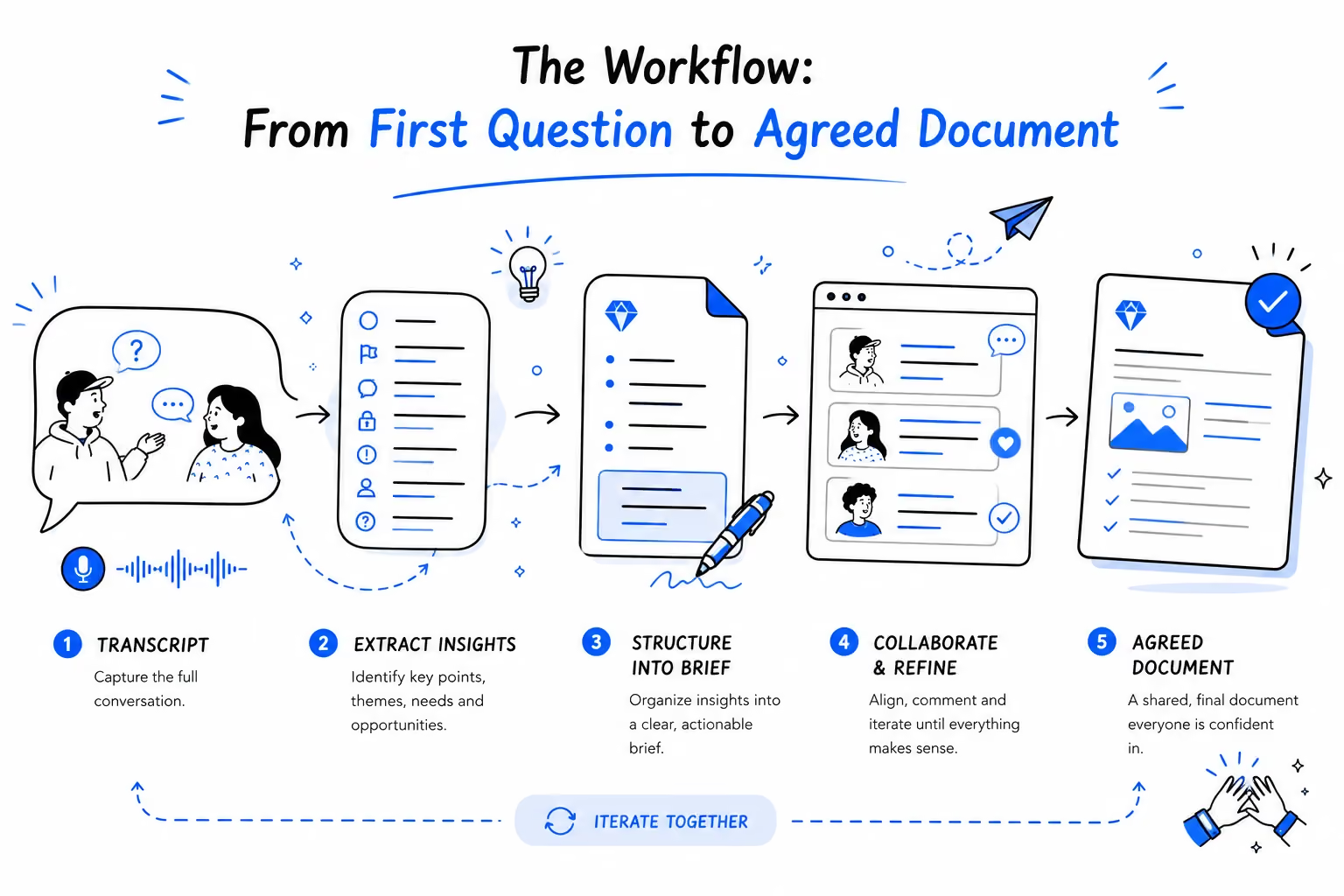
Our current process, step by step:
- Client brief – filled in by the client; product or branding, depending on the engagement.
- Custom questions – built from the gaps in that specific brief, never from a generic template.
- Client documents and analytics – decks, metrics, past research, whatever exists.
- The call – with founders or the product team, recorded. We currently use Fireflies for transcription; the tool matters less than the rule: every relevant client and product conversation is recorded and transcribed.
- AI analysis – the transcript, brief, and documents get processed together into a structured set of findings.
- The structured brief – requirements, open questions, and contradictions, assembled into one document.
- Visualization – the earliest possible translation of the document into something visual: concepts, wireframes, coded interaction prototypes.
- Review and agreement – the client reviews the structured brief and any visualizations we used to clarify ambiguity, corrects the interpretation, and signs off. From that point it's the project's reference document.
Steps 1–3 exist so the call itself is spent on the right questions. Steps 5–8 exist so nothing said on the call gets lost between people.
The order of steps 7 and 8 is deliberate. The document we approve is not necessarily the first version of the brief. Sometimes we visualize an ambiguous requirement before formal approval, because a small prototype exposes misunderstanding faster than another round of discussion. The final agreed document incorporates what we learn from that reaction – it's approved with that knowledge in it, not before it.
What AI Extracts – and What It Doesn't Decide

From a 60-minute conversation plus supporting documents, the AI pass pulls out:
- Goals and business priorities
- Priorities – signals about what appears to matter most, based on emphasis, repetition, stated goals, and context
- Requirements and feature requests
- Implicit requirements – things never phrased as requirements but embedded in the conversation. "We need this to feel premium" becomes: subjective requirement → needs clarification → potentially affects typography, spacing, motion, and visual hierarchy
- Constraints – technical, legal, budget, timeline
- Pain points and user problems
- Stated assumptions
- Contradictions – places where the client's answers disagree with the brief, or with each other
- Unanswered questions – what the call didn't resolve
The last two categories are what make this more than a summary. A summary tells you what was said. This structure tells you what still needs to be decided – before design starts, not three weeks into it.
If this whole system has one principle, it's this: AI expands the input. Humans make the decision. The difference now is what that decision rests on – the complete conversation instead of a filtered version of it.
The Transcript Is Not Automatically the Truth
A transcript preserves what was said, not what was meant. AI can structure a conversation – it can also misinterpret it. A confident-sounding structured brief built on a misreading is more dangerous than messy notes, because it looks finished.
Neither a transcript nor AI synthesis is truth by itself. An approved interpretation is the working truth for the project – which is why approval is part of the methodology, an editorial step rather than an administrative one.
There's a second reason to work this way. Every project carries a load of ambiguous statements: "make it premium", "it should feel fast", "the navigation should be simple". Left in the brief, this ambiguity gets resolved silently by the designer's assumptions – and surfaces as a dispute weeks later. Our process pulls it forward: ambiguous statement → structured requirement → explicit question → visual interpretation → client reaction. The earlier we expose ambiguity, the cheaper it is to resolve.

The economics of that sentence deserve to be spelled out:
A misunderstanding caught in a kickoff call costs minutes. The same misunderstanding caught in a wireframe costs hours. Caught after visual design, it costs days. Caught after development, it can cost a sprint.
Our whole process is built to move that moment as early as possible.
The Brief Is Not the Destination
A brief has one job: create shared understanding fast enough that it's still relevant. It's a compression layer between conversation and design – necessary, but only as a transfer format.
The chain, end to end – with the prototype at the end testing whether the shared understanding actually holds:
Transcript → Structure → Brief → Prototype → Decision or, when the prototype exposes something unexpected: Brief → Prototype → Discovery → Decision
The prototype occasionally exposes something the team didn't know it needed to decide – and that discovery becomes part of the agreed document, not a surprise in week six. That's the deeper purpose of this whole chain: we deliberately create artifacts that can prove our understanding wrong before that misunderstanding becomes expensive.
That last step is where most brief processes stop short. A brief that never becomes something the client can see is just better-organized notes.
The Agreed Document Becomes the Shared Source of Truth
Before the structured brief goes into design, the client reviews and approves it. Far from a formality, it's the mechanism that makes the rest of the project cheaper. It turns an interpretation into an agreement. The client said something, AI structured it, the team interpreted it – and the client approved the interpretation. After that point, "that's not what I meant" becomes much easier to resolve.
The approved document is what the team designs against and what settles disputes later. When a stakeholder joins in month two and asks why the product works this way, the answer is a section of a document both sides signed off on – not an archaeology dig through email threads.
From Words to Something You Can React To
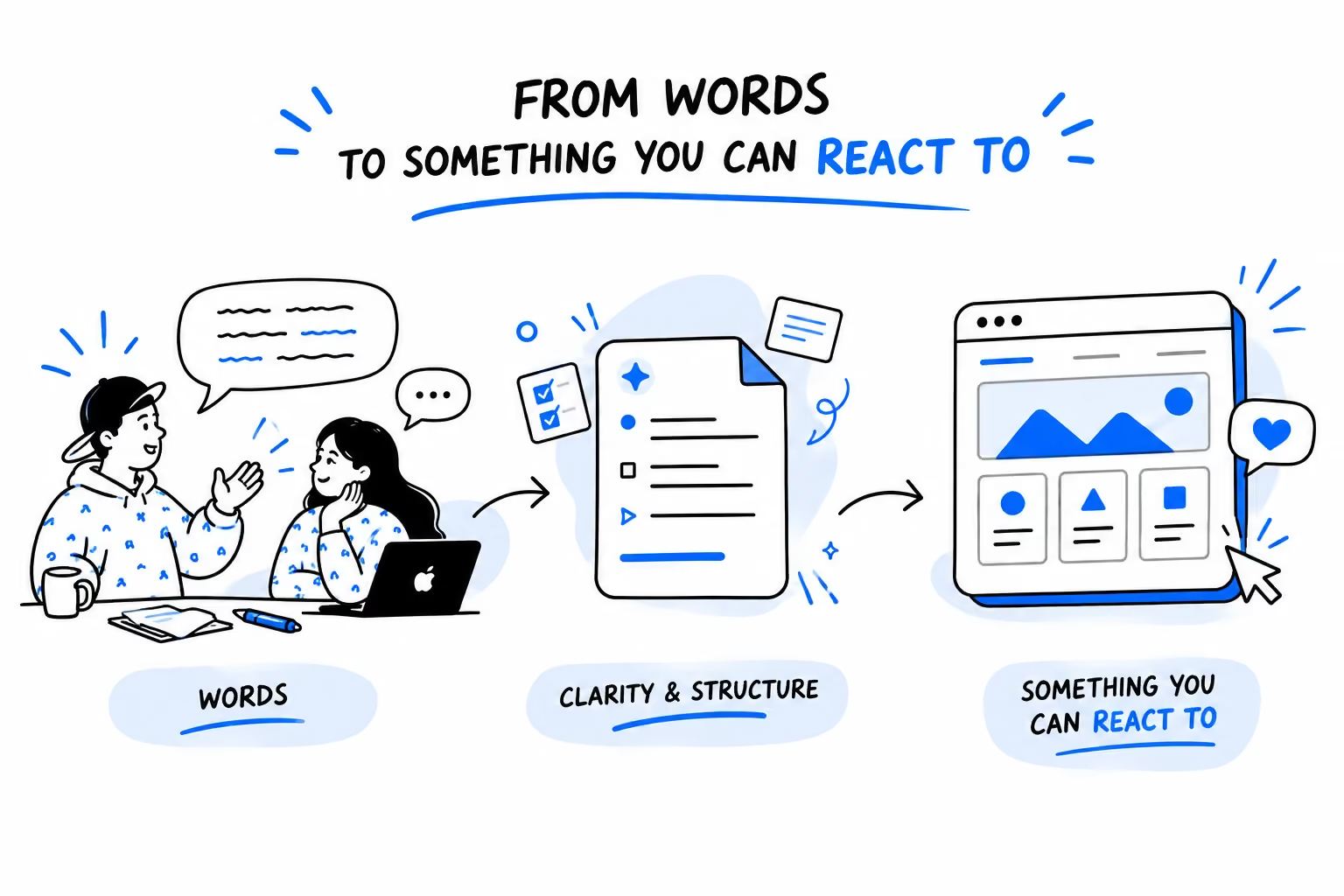
Long before full design, we sometimes translate ambiguous parts of the brief into something visual – a wireframe, an interaction fragment, or a small coded prototype – and put it in front of the client. In this part of the process, visualization verifies that we understood the conversation correctly – and sometimes surfaces what nobody had formulated yet. Exploring what the interface itself can become is a different discipline – that's the next article in this series.
Each example follows one of two chains: words → interpretation → artifact → reaction → decision, or brief → prototype → discovery.
Example 1 – Teamtopia: when the prototype exposes the real scope
Teamtopia's product model was complex enough that much of it lived in one person's head. There wasn't enough time to document every state, transition, dependency, and edit flow before development was supposed to begin.
Instead of trying to describe the whole system in static screens, we modeled it as one interactive prototype, with flows and entities connected the way they would be in the product. What happened next was more valuable than another set of screens: the team experienced the product as a system. Some interaction decisions changed. Missing parts became visible. Micro-interactions moved from written descriptions to things you could try.
Most importantly, the prototype revealed the actual implementation scope. On paper, the product looked ready for development. In the prototype, it became clear that this version was an enterprise-scale engineering project – and that changed the team's understanding of the resources required, before implementation started. The project didn't move into development – and that was the useful outcome.
Example 2 – GrinderLab: using generation as design research
Before designing the actual page concepts, we ran the GrinderLab brief through multiple prompts in Claude Code and Figma Make, generating blocks and whole pages as wireframes – a fast way to turn the brief and research into visible hypotheses. Rather than aiming for a final design, we wanted to widen the search space first: what blocks might the product need, how could the information be organized, and how could the same content be presented on desktop and mobile? Different generations surfaced different structures and content patterns – some useful, some not. Together they gave the team more material to evaluate before committing to a direction. Before committing to one design, we want to know what we are choosing between.
The first generated versions were far from final – but they also surfaced details we hadn't explicitly designed yet. At the time, we were still working through the requirements of the Italian gambling market, and the generated interfaces already included regulatory elements – Responsible Gambling messaging, "Solo operatori ADM · 18+" marks – that could easily have remained implicit while the overall product structure was still being defined. The client noticed them immediately – and liked that they were already there.
The final design was assembled by hand, from everything the variants had shown. Manually rebuilding the pages was faster than explaining every correction to the AI – and by that point the generated versions had already done their job. Some generated blocks moved into Figma, structurally refined, and reused as wireframe material. That changed what the first generation was useful for: another source of information rather than the answer. Instead of spending the early design phase deciding exactly where every piece of content should go, we spent more of it asking which content mattered, which structures made sense, and how the experience should adapt between desktop and mobile.
The value of the first generation was coverage, not accuracy. It was there to make possibilities and gaps visible before we committed to one direction. That's a different role for AI in design: it expands what the designer gets to notice, instead of replacing the designer's judgment.
Example 3 – when a text block became a calculator

For one of our current client products in the Asian iGaming market, the task was a referral page, with its blocks specified in the client's requirements. One block was defined as text: an explanation of how referral commission is calculated – Commission = Game Edge × Eligible Settled Wager × Commission Rate – with definitions for each term and VIP-level rates. A reasonable, honest block. On paper.
The product designer ran that block through several prompts in Figma Make and Claude. What came back reframed the requirement: instead of a paragraph explaining the formula, a calculator that runs it – sliders and selectors for average wager, game edge, and VIP rate, with projected earnings for 1, 5, 20, and 50 referred friends updating live. The requirement said: explain the formula. The generated version asked a better question: why not let the user run it?
Figma Make Prototype
Final Design
The final component was designed by hand from that direction – the generated version supplied the concept, the design system supplied the craft.
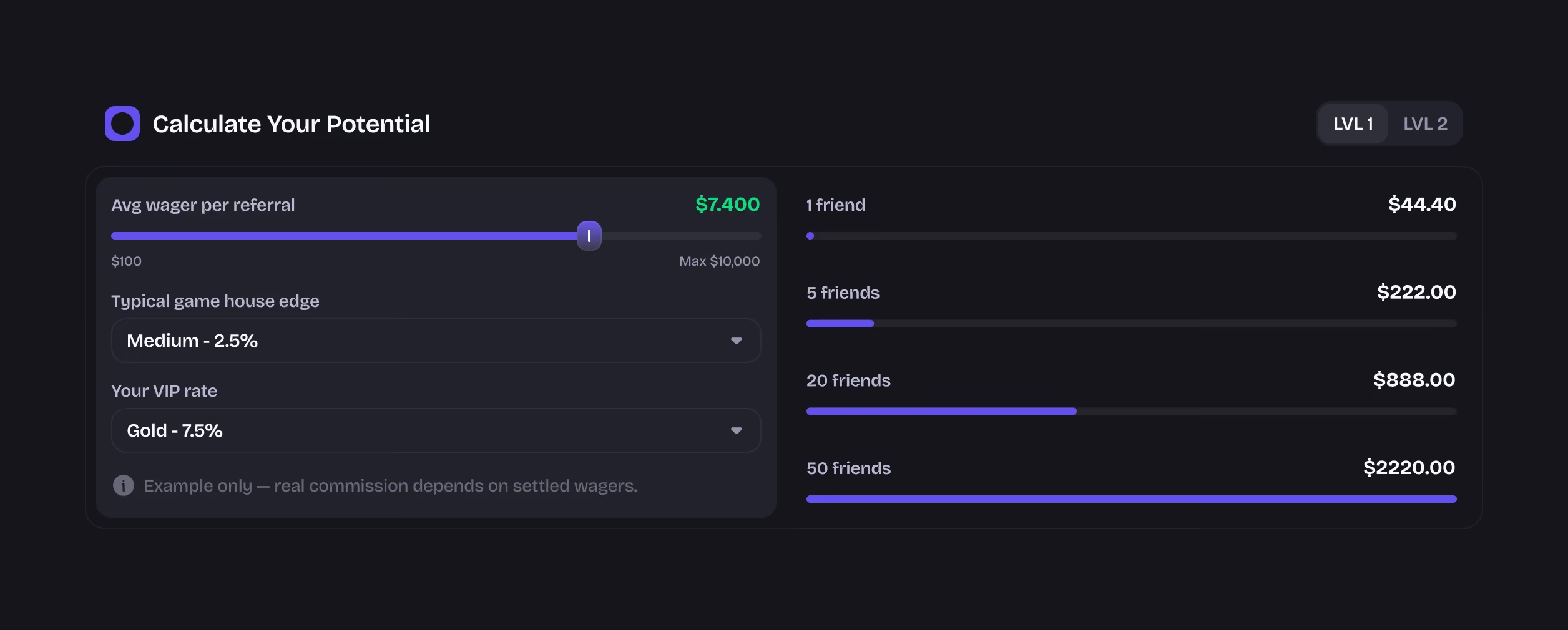
The client's document contained the right information. What it couldn't contain was the observation that users don't read commission formulas – they want to know what they would earn. A formula the user can play with beats a formula the user has to read.
This one component compresses the whole methodology of this article:
Requirement (explain the commission formula) → AI-generated hypothesis (what if this was interactive?) → Prototype (a working calculator) → Human design (the final component, built in the design system) → Decision (users don't need to read the formula – they need to see what they could earn).
The client reacts to the idea itself instead of approving a description of it. And once the prototype stops being just a communication tool and starts becoming a way to explore behavior, we're in the territory of coded prototypes – the next article in this series.
What This Changes for the Client
Everything above is process. Here is what that process buys a client:
- Fewer misunderstandings before design starts – the expensive kind that surface in week four get caught in week one.
- Faster alignment between stakeholders – everyone argues against the same approved document instead of competing recollections.
- Earlier discovery of hidden complexity – scope surprises arrive while they're still a planning question, before they become a budget question.
- Less expensive changes later in the project – because the moment of correction moved to the cheapest point on the curve.
In practice, this is the discovery layer of product design – done and agreed before design commits to a direction.
Where This Leads
This is the second layer of the system this series describes. The first – research and product intelligence – answers who the users are and what the market looks like. This layer answers what the client and product team actually mean – and turns that understanding into something both sides can test. The next one, coded prototypes, tests what those decisions feel like in reality.
The through-line stays the same: we use AI and code to make design more testable – not just faster.
Losing decisions somewhere between calls and briefs? Send us the conversation. We'll turn it into a structured brief and a first visual your team can react to – before design commits to anything.

Frequently Asked Questions
How do you turn a meeting transcript into a design brief?
Record and transcribe the call, then process the transcript together with the client's brief and documents through AI analysis. Extract goals, requirements, constraints, contradictions, and unanswered questions into one structured document. The client corrects and signs off on it, and the approved version becomes the project's shared source of truth.
What gets lost between a client call and a design brief?
Hesitations before an answer, the feature a client mentioned twice unprompted, a technical constraint dropped as a half-sentence, the moment two stakeholders quietly disagreed. Note-taking discards exactly the informal signals a designer needs most, because each handoff – notes, brief, design – compresses the conversation further.
Can AI write a design brief?
AI can structure one – extracting requirements, constraints, and contradictions from a transcript far more completely than manual notes. It cannot decide what matters, prioritize trade-offs, or translate requirements into design direction. In our process AI structures the raw conversation; the designer and the client make every decision that follows.
Why show the AI-structured brief to the client?
Because approval turns a document into an agreement. The client corrects misreadings before design starts – far cheaper than discovering them in week four. The approved brief then serves as the reference point both sides return to when scope, direction, or priorities get disputed later in the project.
Should every meeting be transcribed?
No. The principle applies to conversations that contain product, business, user, or design decisions – kickoffs, discovery calls, product team sessions. The goal is to avoid losing important context at the moments where decisions are being shaped, stated, or contradicted – rather than to record everything.
Why visualize a brief before the design phase?
Because people react to something they can see more precisely than to something they have to imagine. A wireframe, an interaction fragment, or a small prototype can expose ambiguity before the design gets built around it – a sentence like "the transition should feel immediate" reads as agreed until two people picture different things.
