





Domain Modeling Before a Single Screen: How We Found the Product's Atom





How we approached the conceptual model behind Teamtopia – a leave management system built at Flatstudio – and the modeling principles that came out of it.
Written for product designers, product managers and tech leads working on systems where the obvious structure stops working.
Interfaces are the last thing I decide. What comes first is what the things inside a product mean, and how they relate. That layer – the conceptual model, the domain model, whatever you want to call it – is what decides whether a product will hold together or slowly turn into a pile of features.
None of the principles below were applied from a textbook. They came out of a specific product, and I only recognized afterwards how much they overlap with ideas from domain-driven design – which is reassuring rather than surprising: people wrestling with the same problem tend to arrive at similar places.
Teamtopia is a good case to talk about that, because the problem was unusually tangled.
On the surface it's an ordinary leave management system, originally built at Flatstudio for our own team and our engineering partner Push – two small companies that wanted to replace spreadsheets, emails and shared calendars with a single tool. Employees request time off. Someone approves it. The company sees who's available. Nothing exotic.
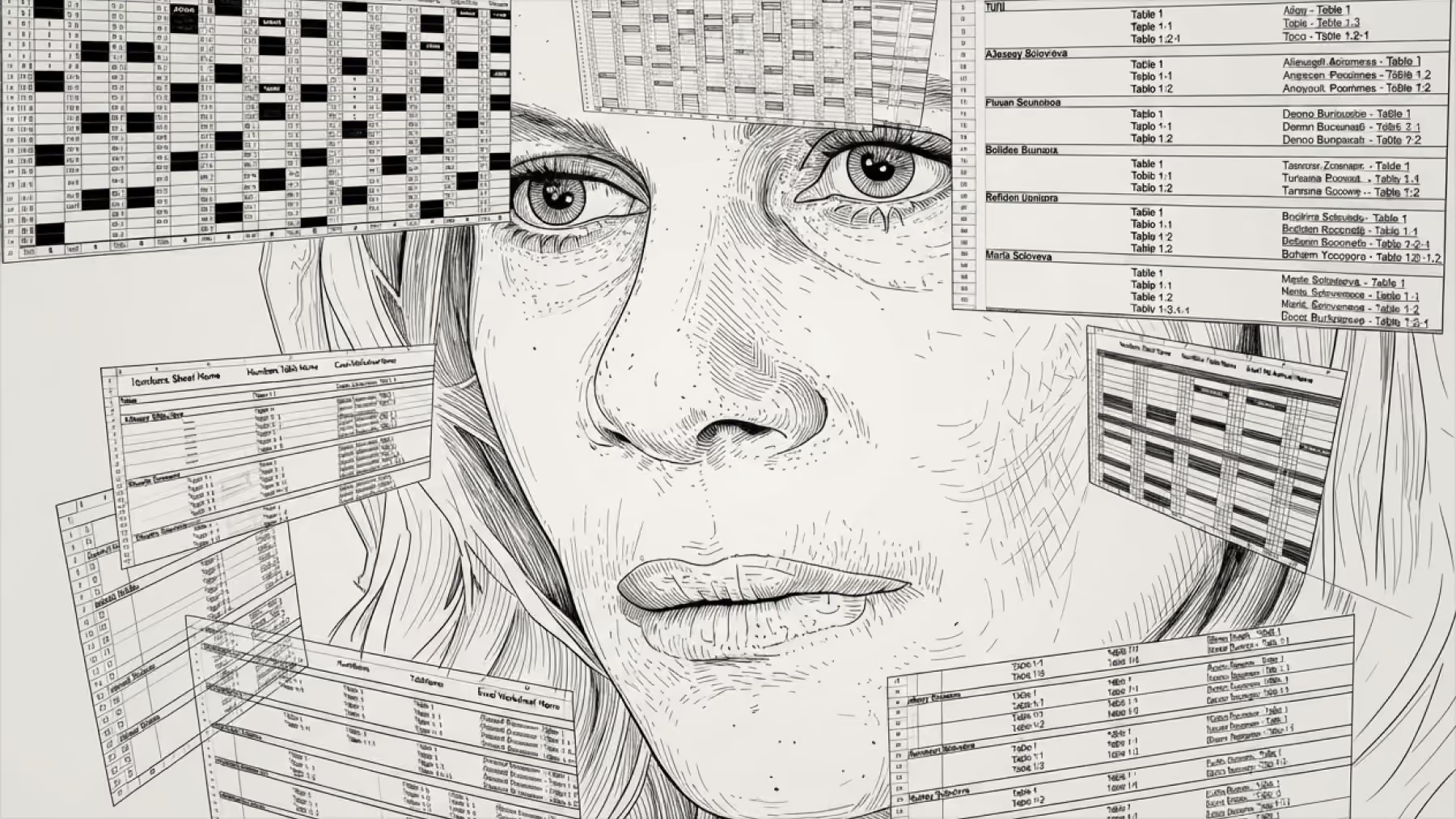
But underneath those plain requirements sat a surprising number of questions with no obvious answer – questions about what a concept really means, where responsibility belongs, and what a system should decide versus what it should leave to a person. This article is about those questions, and about the principles I keep returning to whenever a product gets complex enough that the familiar structure fails.
The examples are specific to Teamtopia. The principles aren't.
TL;DR
- Find the smallest thing your product must answer – its atom – and build every other concept as a layer over it.
- A familiar word (Office, Department, Role) earns its place in the model only by doing one specific job.
- The system computes risk; a person decides. Automation stops being honest where the software can see supply but not demand.
- A screen is a view of the model, not a new entity in it.
Part I – Finding the right things to mode` l
What should you model first in a complex product?
The most natural way to begin designing any system is to describe how the subject is structured. For an org tool, that means the org chart. For a shop, the departments. For a document app, folders and files. The structure is right there, in the words people already use, so it feels like the correct foundation.
It usually isn't.
Structure describes how something is arranged. A product exists to do something. And the arrangement almost never maps cleanly onto the action.
In Teamtopia, the first model mirrored the vocabulary companies use about themselves: Company, Office, Department, Project, Employee. Reasonable words. But working through real scenarios, I kept hitting a different question. Not "how is this company organized?" but "what actually changes whether a person can take a day off?"
So I stopped asking how the company was arranged and asked instead what the product ultimately had to tell the user. The answer turned out to be surprisingly small: *can this person be away on this specific day?* One person, one day, one status. Everything a user really wants from the product collapses to that.
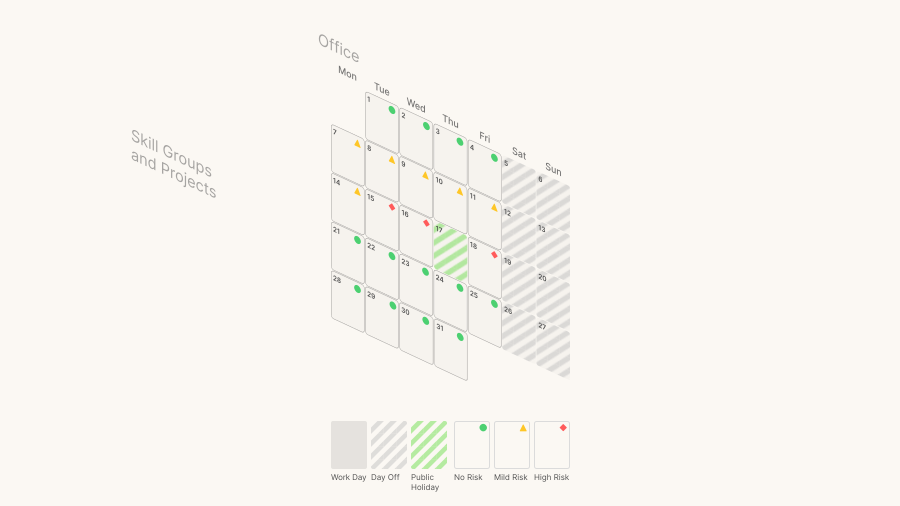
That was the atom. Naming it changed everything, because it gave every other concept a job to justify. Months and calendars are just aggregates of days. Offices, skill groups, projects – none of them are things the product is *about*; they exist only to lay their own rules on top of a single day and shape its status. The moment the day became the center, the rest of the system stopped being a set of boxes to organize people into, and became a set of layers over one atomic unit.
The lesson generalizes past org charts and past calendars. Before modeling how your subject is arranged, find the smallest thing your product ultimately has to answer or produce – its atom – and build everything else as layers over it. The structure you started with is one of the inputs, not the ground floor.
A familiar word is not a reason for an entity
Once you start judging concepts by the work they do rather than by how familiar they are, some of them have to justify themselves – and some fail.
The clearest question in Teamtopia turned out to be deceptively simple: where does an employee's calendar come from? People inside the same company didn't share one. Those on local contracts followed the country's public holidays and labor rules; remote people didn't, and were given a larger vacation allowance instead. Same company, fundamentally different calendars.
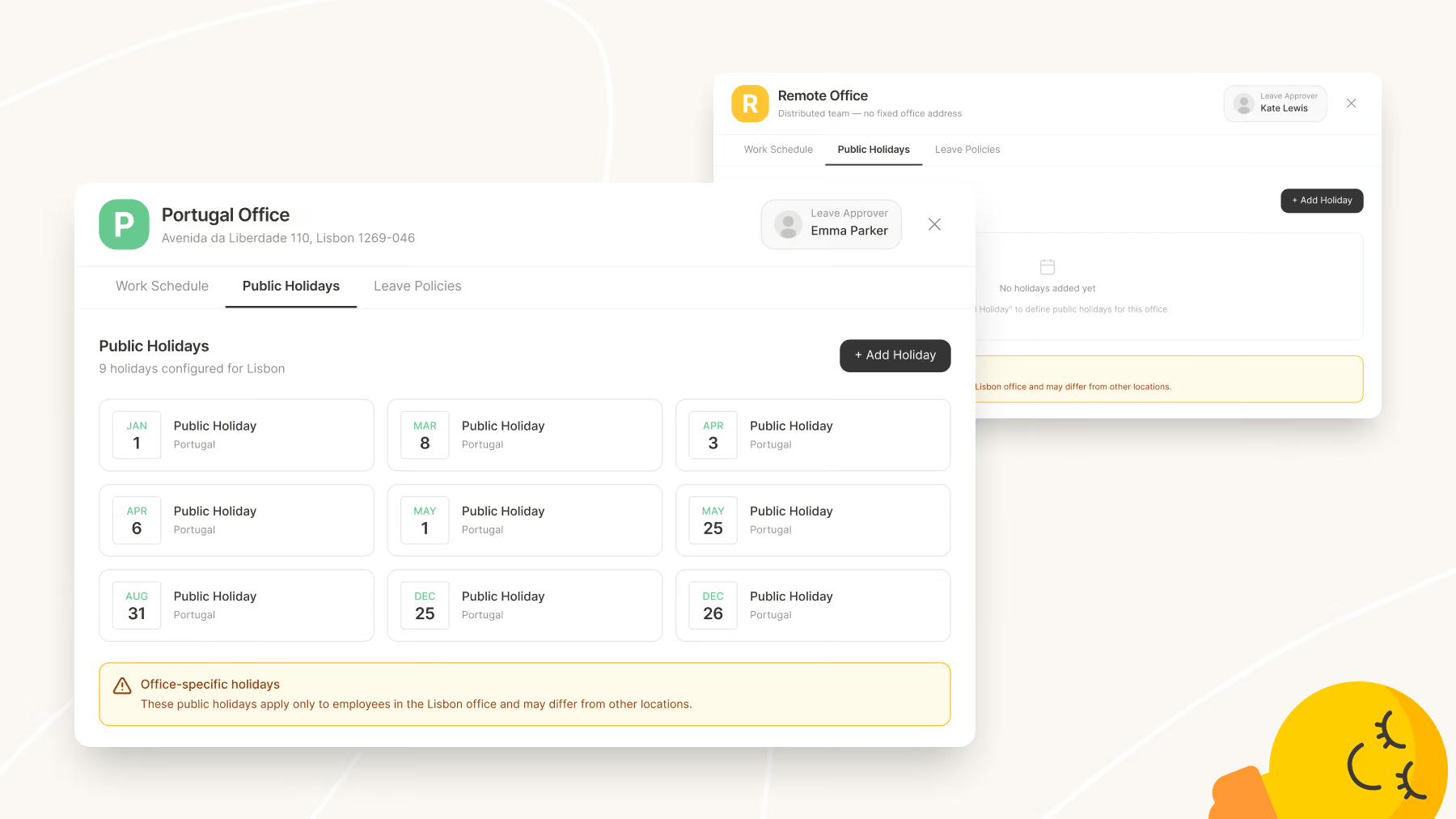
So each employee needed a baseline, and something had to define it. That something became Office.
Geography had nothing to do with it – most of these people worked from home in different countries. "Office" survived because it was a familiar word that explained, without instruction, why a group of people would share the same working days, holidays and leave policy. We kept the word and quietly redefined what it *is*: not a location, but a bundle of calendar rules. The proof that this was a real abstraction rather than a renamed "branch" is that one of our offices was called Remote – no country, no public holidays at all, the difference made up through a higher day allowance.
The transferable point: a concept earns its place in a product by doing a specific job. Being common in the real world counts for nothing. Borrow the familiar word if it helps people understand – but be willing to redefine what it actually means inside your model.
Part II – Splitting responsibility correctly
Two questions hiding in one word
The most useful habit I've developed in modeling is suspicion toward words that feel obvious. A single familiar term usually smuggles in two different questions, and until you separate them, the model looks simple while quietly being wrong.
Teamtopia was full of these.
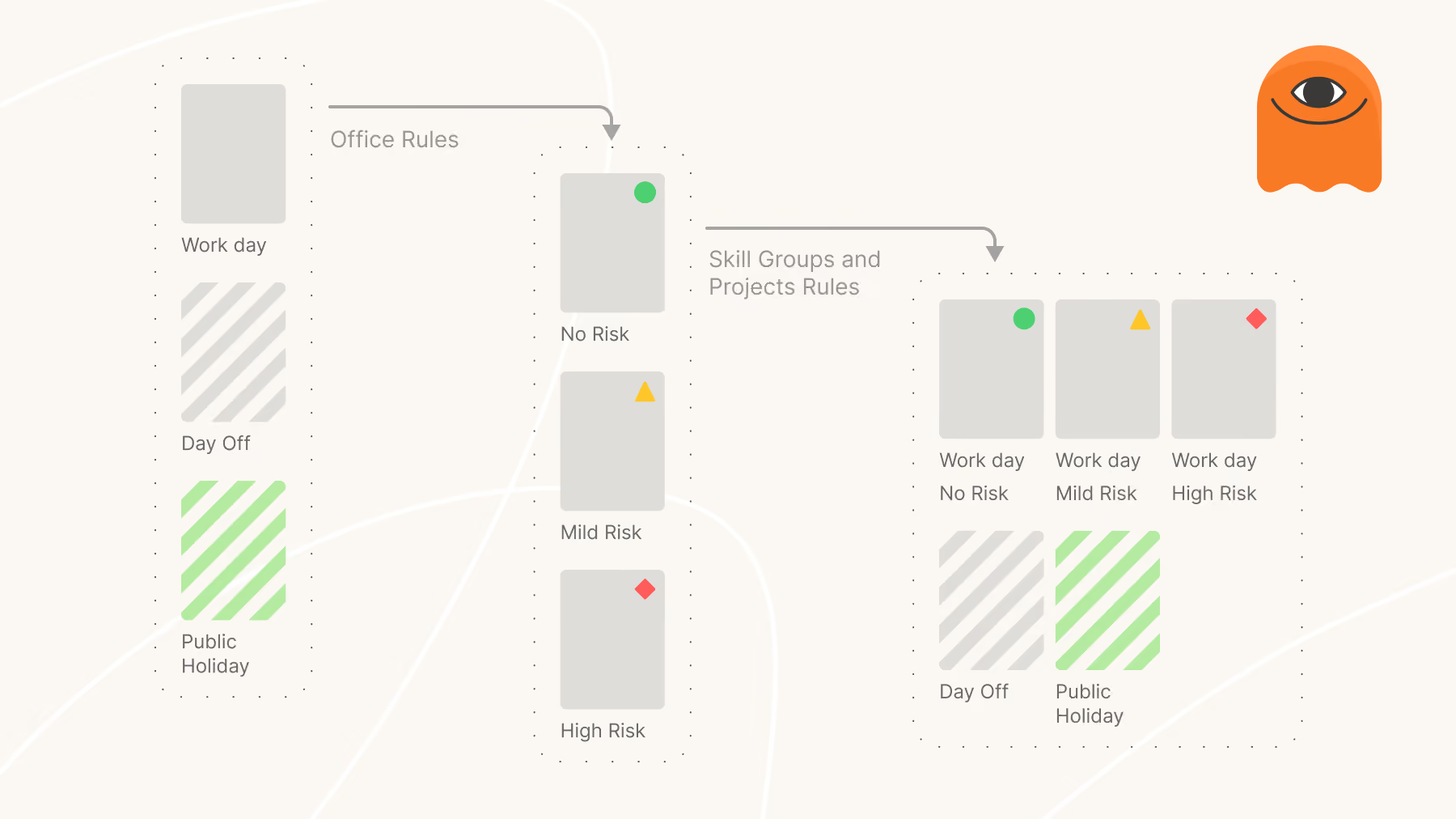
Take the atom itself – the day. The layers stacking on it don't all ask the same thing. Office answered one question about a day: what kind of day is it? – working, weekend, public holiday, company shutdown. It was tempting to let every other concept keep answering that same question. But Skill Groups and Projects weren't answering "what kind of day is this?" at all. They were answering something else entirely: what happens if this person is absent on this day?
That sounds like a small distinction. It reshaped the whole architecture. A Skill Group never turned a working day into a holiday – it measured whether enough people with a given ability would still be around. A Project did the same, but scoped to a client commitment. Neither touched what the day *was*; they added a separate layer of meaning on top of it – risk, capacity, coverage.
Once you see the split, you stop making entities compete to define the same thing. Each one owns its own question.
The same lesson repeated with roles later in the product – but I'll come back to that.
The same word can do a different job in a different place
Splitting concepts apart has a mirror image: sometimes a concept you correctly discarded comes back, because a *different* problem needs it.
I dropped Departments from the core model early. By the test above – what does it change about a day? – a department did nothing. It described how the company looked on paper and said nothing about who could cover for whom. For calendar logic, it was dead weight.
Then a different problem appeared: who approves requests?
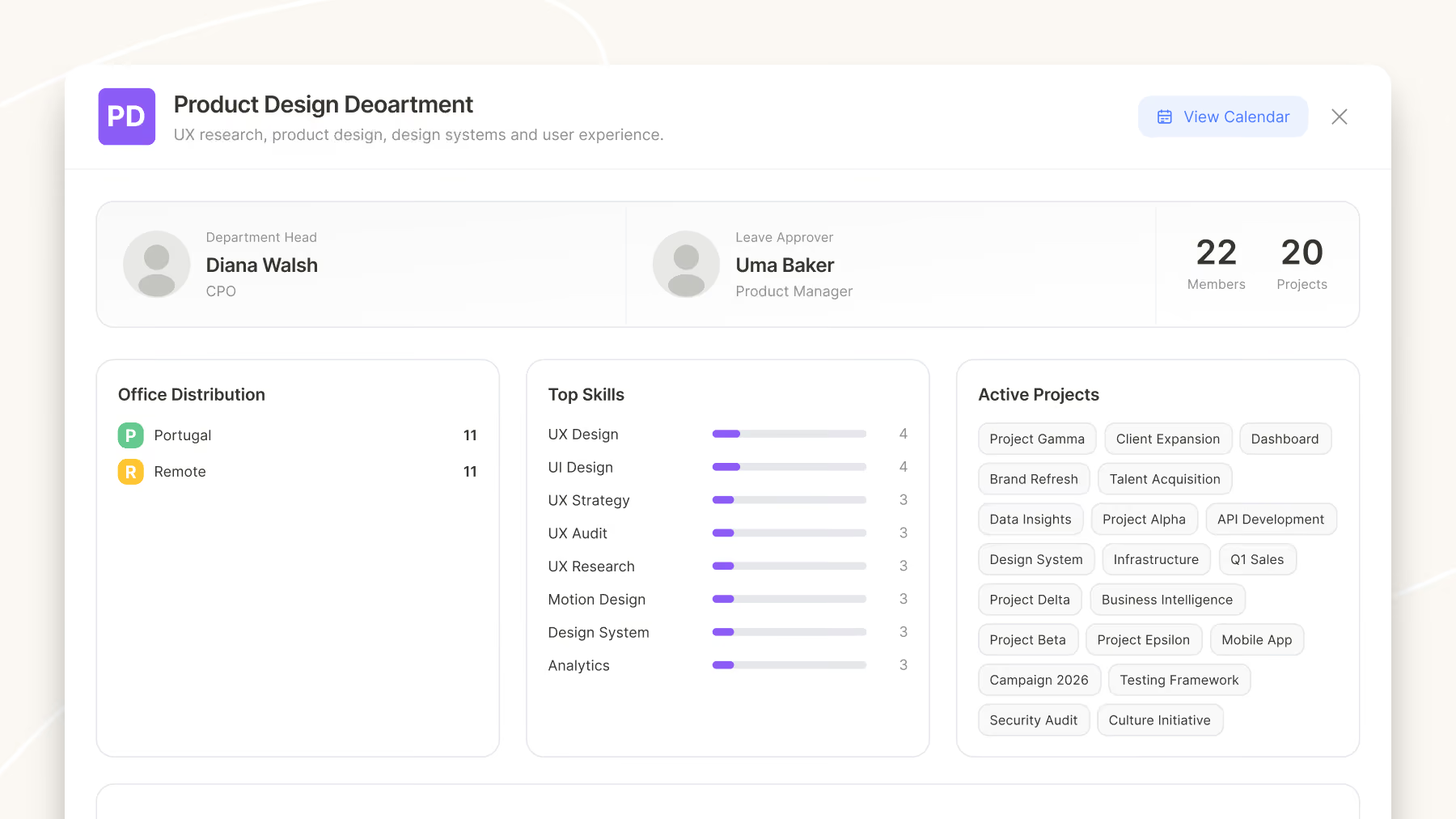
We first tied approval to Office. But for a distributed team, Office is the wrong axis. If a designer takes leave, it doesn't matter that no one else in their "office" is a designer, as long as designers on the remote side keep working. What decides it is whether the *kind of work* stays covered, and that has nothing to do with where people sit. Approval needed to hang on a grouping by function, not by geography.
That's exactly what a department is. The concept that was useless for building calendars turned out to be the right home for responsibility. Same word, entirely different job.
So three organizational concepts ended up coexisting, each answering one question and only one: Office described the calendar, Skill Group described capability, Department described responsibility. In a real company these overlap – the same designers can be a skill group and a department at once – but keeping them separate in the model made everything downstream easier to reason about.
What should the system decide – and what must stay human?
Once the system could measure risk – whether enough people with a needed skill remained available – there was an obvious temptation to let it decide. If a skill is understaffed on a day, why not just block the request?
We came close to that mistake before catching it.
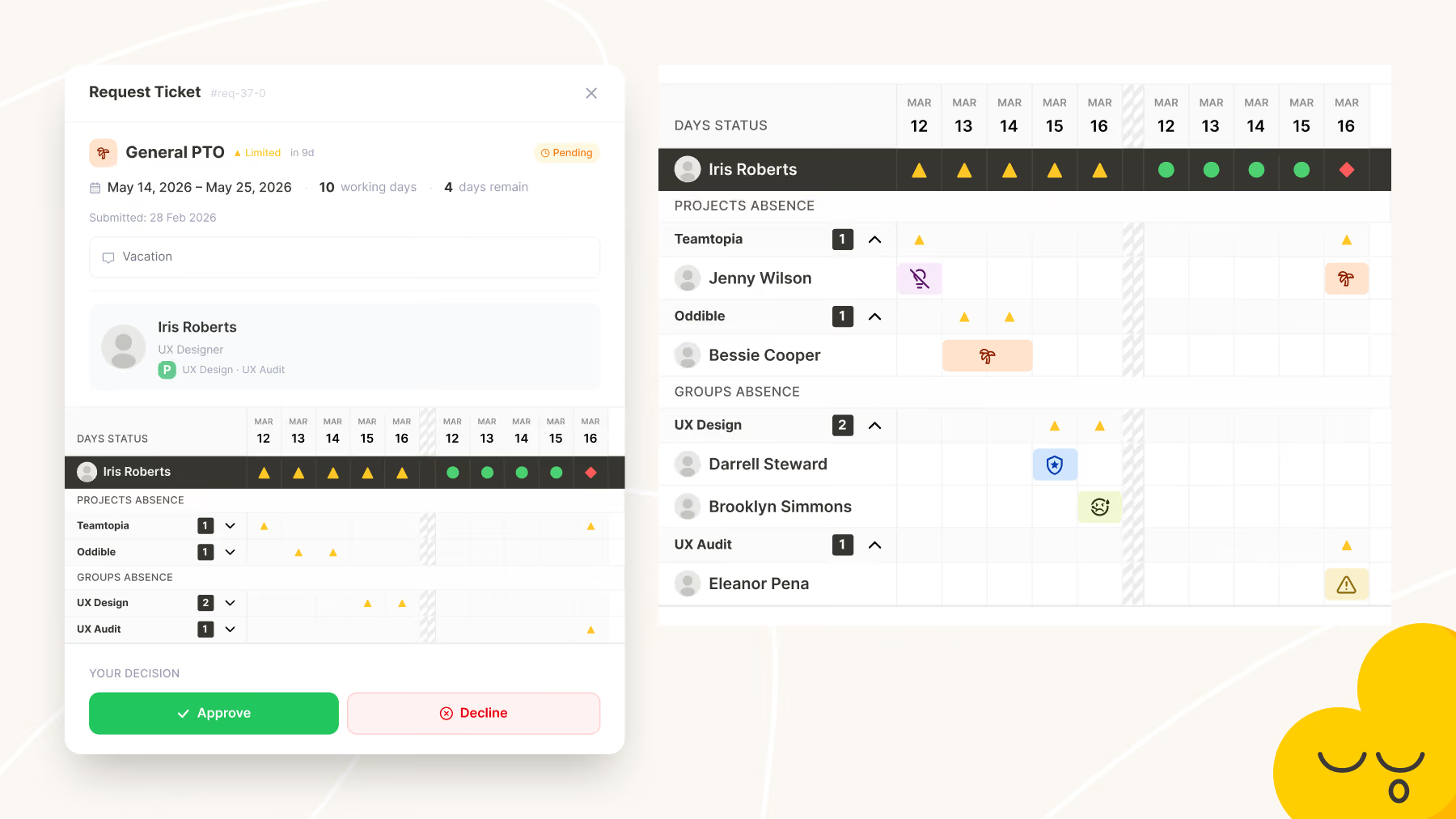
A person belongs to several skill groups and several projects at once. Under strict blocking, almost every working day would light up as "unavailable". The signal would be technically correct and completely useless.
And there was a deeper reason. The system knows one thing and not another. It knows whether the people are there. It doesn't know whether the *work* is there.
A skill might have no one available on paper, yet if nothing requiring that skill is planned for those weeks, the absence costs nothing. That context lives with a manager, not with the software.
So we made what became the most important decision in the product: the system never blocks and never approves. It shows the level of risk and what that risk is made of, and it hands the decision to a person – who can arrange a replacement, accept the risk deliberately, or decline with a reason. The tool stopped being a gatekeeper and became a way to make visible what used to live only in someone's head.
That line – between what software should compute and what it must leave to a human – is one of the most transferable decisions in the whole project. Maturity here means knowing where automation stops being honest, not automating further.
A role is not a level of access – it's a set of independent jobs
The habit of splitting slippery words paid off most clearly with roles.
The tempting model is a single ladder of access: employee at the bottom, someone who approves above them, an administrator who can do everything at the top. Almost every system reaches for this. It's wrong, because "configuring the system" and "being responsible for other people's leave" are independent jobs, not two rungs of one ladder. In a larger company they're often different people entirely – someone who sets the product up may never approve a single request, and a manager who approves requests may have no business editing settings.
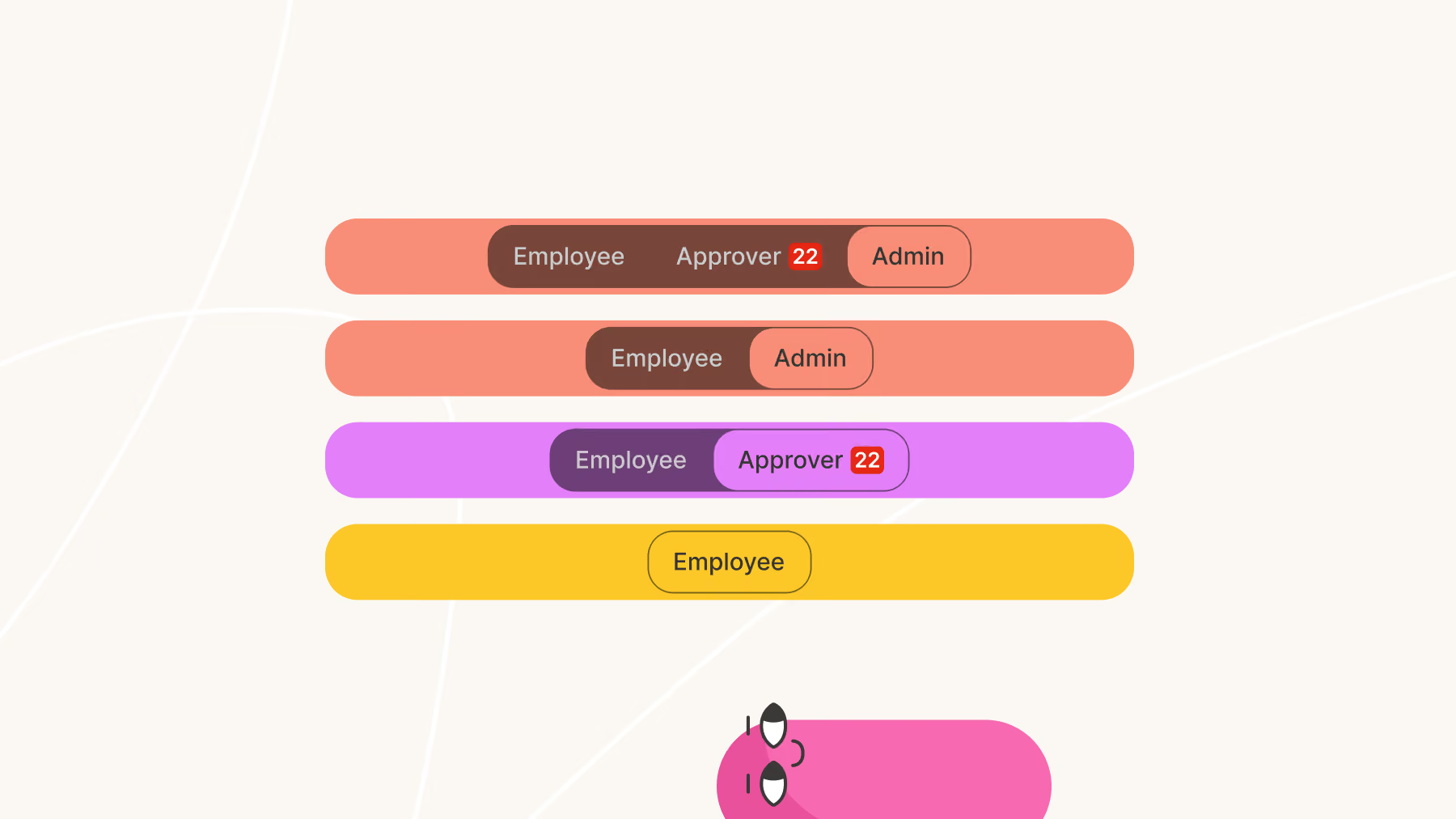
So we separated the axes. Underneath everything, a person is an employee – always, because everyone needs time off, including the founder. On top of that base, two independent things can be attached: admin rights (what you can change about the system) and approver duties (whose requests you're responsible for). You become an approver by being attached to a part of the org – an office or a department. Being an approver isn't a level of access; it's a relationship to a zone of responsibility.
Separating the axes created a new problem, and this one showed up on screen. Three jobs mean three different reasons to open the product. As an employee I want my calendar and my available days. As an approver I want other people's requests and a view centered on the people I'm responsible for. As an admin I want the overall picture. Serve all three through one interface and you get noise – the same screen asking an approver to both process others' requests and book their own leave.
The answer was modes. One person, but the interface switches context: in each mode it's rebuilt around a single job. This came straight out of the earlier principle – if the employee is the base layer and everything else is attached on top, the interface should be built the same way: a base plus the context currently in use.
Part III – Showing the model
A screen is a view of the model, not a new thing in it
A quieter principle surfaced while I was working on calendar views.
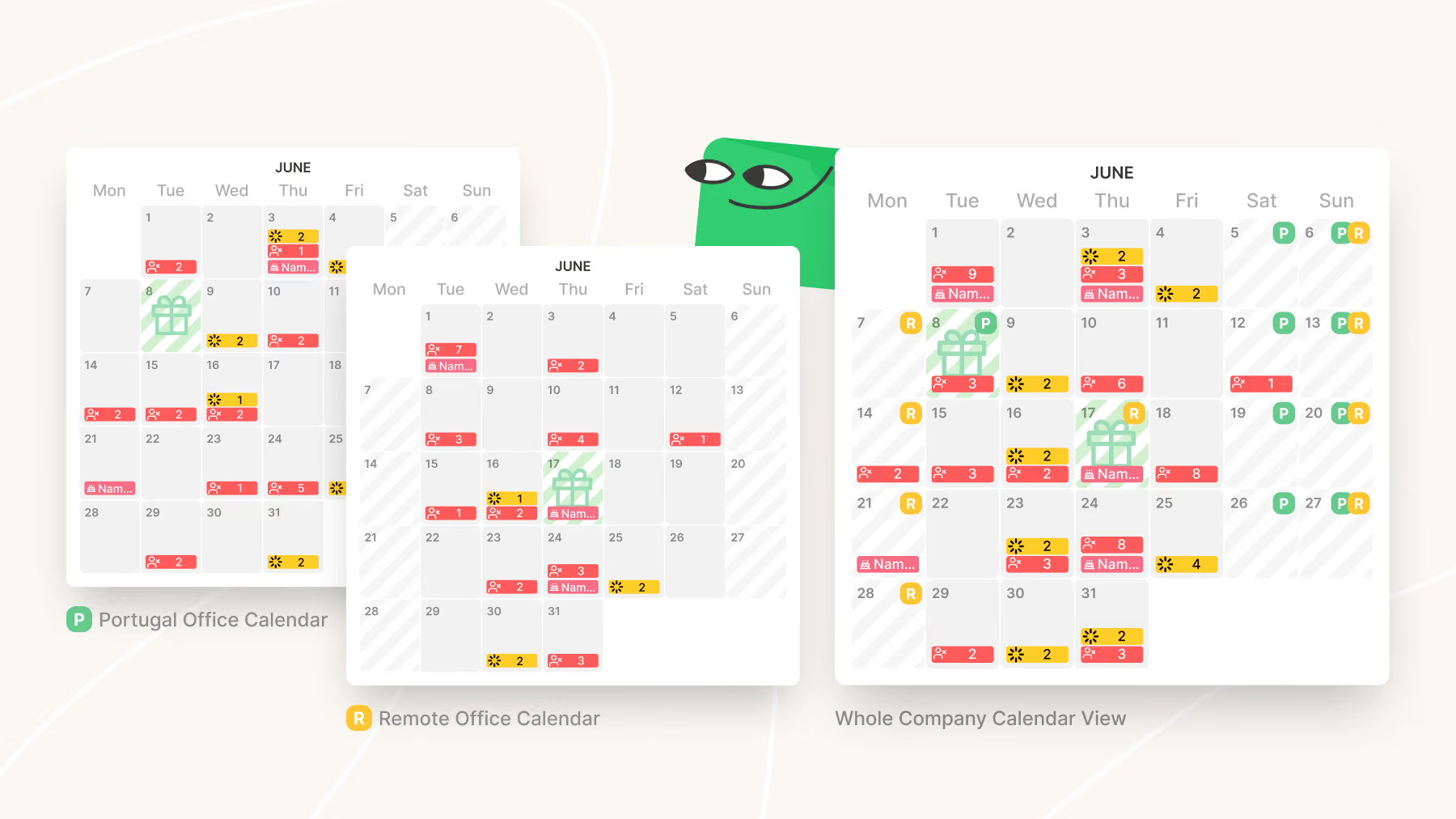
Every Office had a calendar that actually existed as data. The *Company* calendar didn't. It was never a separate object – it was simply a way of looking at all the office calendars at once.
That could sound like an implementation detail. For me it became a modeling rule: a screen isn't a new entity, it's a viewpoint onto something that already exists. Once I saw the product this way, a lot of decisions got simpler. Dashboards, project views, approval screens – none of them were separate copies of information. They were different angles on the same underlying model: the employee's day and the rules stacked on top of it.
We were building one model and many honest views of it, not a set of little systems each holding its own truth.
A view can be a workplace, not just a window
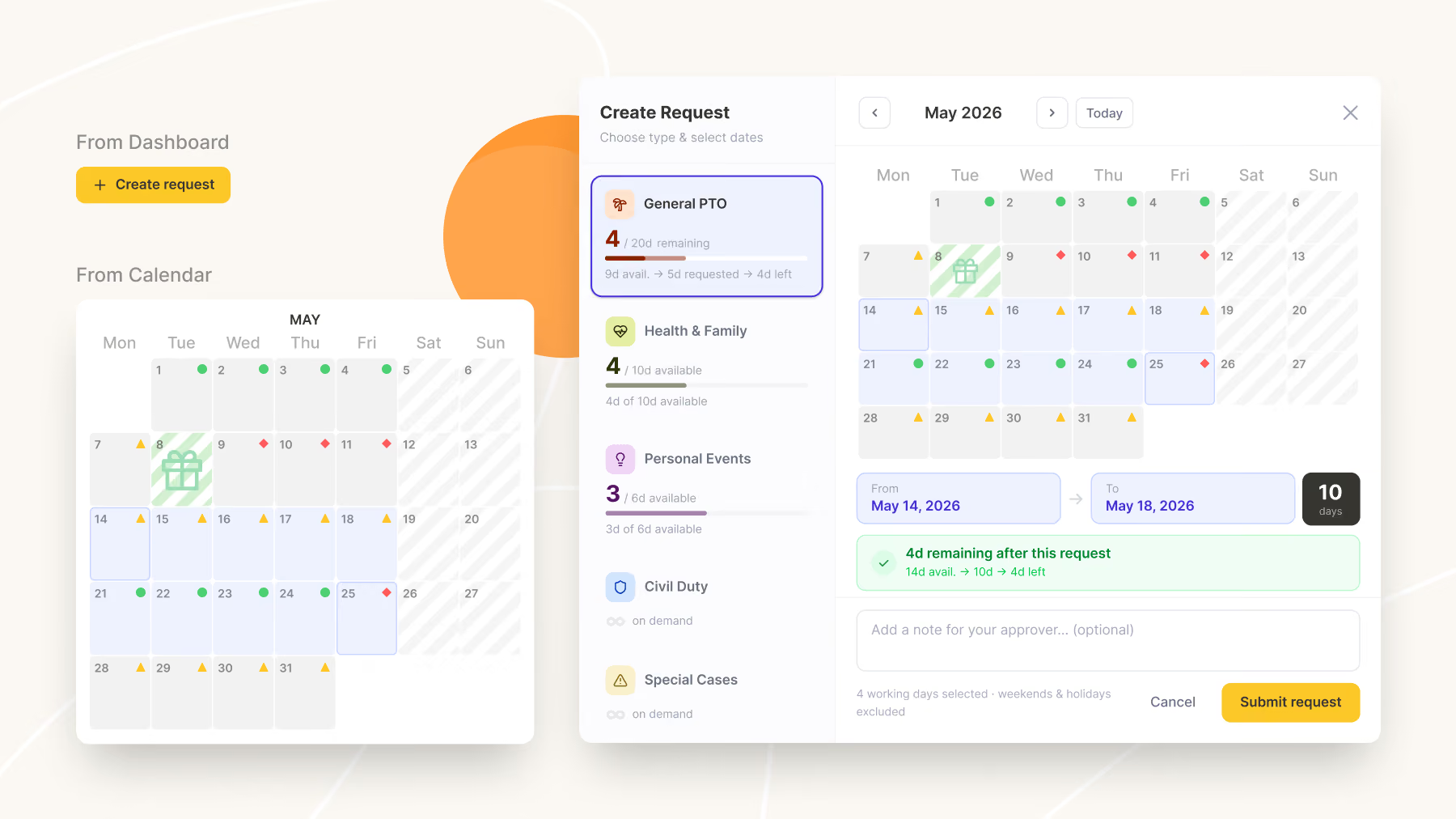
If a screen is only a view of the model, it's tempting to assume views are passive – places to look at what the system knows. They don't have to be. The same information can appear in more than one form, and each form can carry enough functionality that people actually work inside it.
What makes that worth doing is context. The same task isn't always performed in the same frame of mind. Booking a single sick day is a quick action – you know the date, you just need it recorded. Planning a two-week holiday is a different job: you want to see the whole year, where the public holidays fall, who else is away, whether those dates are a bad idea. Same request, same underlying data, but one needs speed and the other needs surroundings.
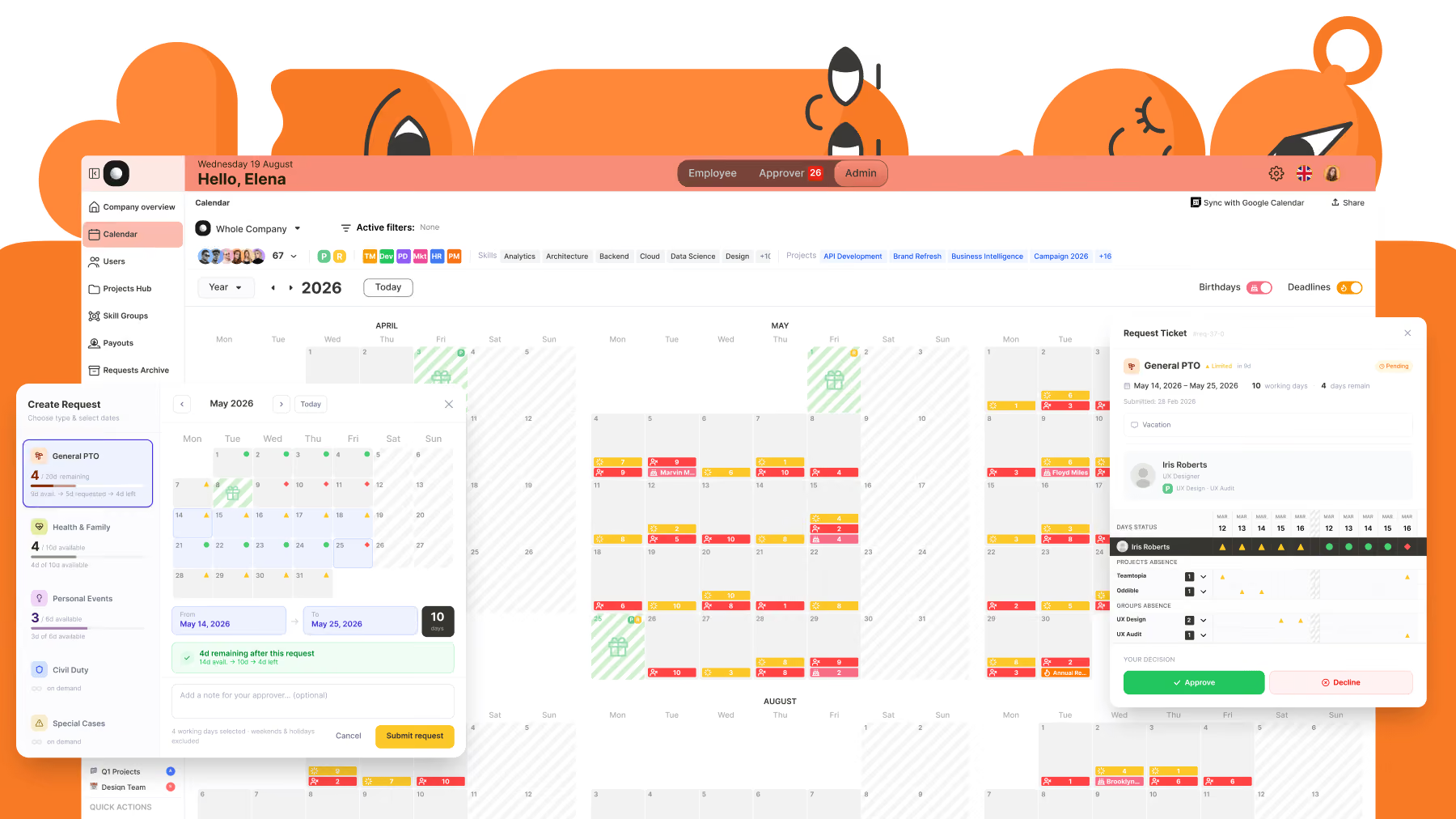
So in Teamtopia the calendar isn't just a window onto the model – it's a second place to do the work. Employees and approvers can handle their requests entirely from it, exactly as they can from their dashboards, because a calendar is the shape most people already reason about time in. Nobody has to learn it. The dashboard answers "what's outstanding right now"; the calendar answers the same question with a year of context around it.
When the model underneath is single and honest, multiple representations aren't competing sources of truth. They're different doors into the same room, and people take whichever suits the moment.
What a detailed prototype tells you before you build
There's one more thing modeling gives you, and it isn't about coherence at all. A model built out far enough to click through will tell you what the product costs to build – long before anyone commits to building it.
That's a different job from the usual reason people prototype. Prototypes are normally for validating an idea or testing a flow. But a prototype that covers the real breadth of a system does something else: it converts an abstract model into visible scope. You stop estimating from imagination and start estimating from something concrete.
Teamtopia's second version is where this paid off. The first version has been live since 2023 and still runs the leave process for 10+ companies – around 250 people. It's open to sign up if you want to see the model in use. Back then there were no AI prototyping tools, so the only way to test an idea was to build it for real, straight from the wireframes. The second model, the one this article describes, was different: we built it out as an extensive interactive prototype in Figma Make.
Making the model tangible let us see the true size of the build before a single line of production code – and the honest read was that the second version is enterprise-scale engineering. That's useful information to hold *before* a team starts, not six months in. The model is proven and the scope is understood; implementation becomes a question of capacity rather than direction. Meanwhile the first version keeps doing its job.
The risk being avoided here is a specific one, and it's common. A rich model is seductive: each new rule feels cheap when it's a rule. Prototyping the whole thing prices it. Learning what a system really costs from a prototype beats discovering it halfway through implementation, with time already spent and a half-built system on your hands.
Looking back
The most valuable thing here was never "how to design a leave management system". It was a reminder of how complex products are actually made: by spending more time making the model truthful than by adding features to cover its gaps.
Almost every real step forward came from the same question, asked again and again about each concept in the system: *Does this actually represent reality – or is it just a familiar word we carried in without questioning it?*
Good product design isn't about making interfaces simpler. It's about making the model behind them more truthful. The interface, if the model is right, mostly takes care of itself.
Modeling a product before design is a large part of what we do at Flatstudio. Sometimes that means auditing a product whose model has quietly stopped working — naming what's actually wrong underneath the symptoms. Sometimes it means assembling a dedicated team to build the thing once the model is clear.

Frequently Asked Questions
How do you design a product when the requirements are unclear?
Start from the smallest thing the product must answer, then test every concept against real scenarios rather than against how the organization describes itself. In our case that unit was one person's status on one day, and every other entity had to justify itself against it.
Is a conceptual model the same as information architecture?
They're related but not identical. A conceptual model defines the entities and their responsibilities; information architecture organizes how people navigate and find things. The model comes first – the architecture is one of the ways it becomes usable.
How do you know whether an entity belongs in your product's model?
Check whether it changes the outcome the product exists to produce. If removing it wouldn't alter that outcome for anyone, it's structure borrowed from the real world rather than a working part of the model – no matter how standard the word sounds.
What is a domain model in product design?
A domain model defines what the concepts inside a product mean and how they relate, before any interface exists. It names the entities, the question each one answers, and the rules connecting them – so screens become views of the model rather than inventions.
When should software make a decision instead of leaving it to the user?
Only when it can see both sides of that decision. Systems routinely measure one half of a trade-off and miss the other – ours could see whether people were available but not whether the work needed doing – so it surfaces the risk and lets a manager decide rather than blocking.
Why do complex products end up with too many screens?
Usually because each new view is treated as a new thing rather than as another angle on existing data. Several views of the same model are fine – even useful, when people think in different shapes – but each one should read from the same source rather than hold its own version of the truth.
